The Scoop About Online Snooping

Just when you thought you understood how to handle the privacy protection issues, they pull us right back in. That’s why many of us are worried about how Google’s new privacy policy will affect our privacy online, and what we can do to have a say about how information is currently collected about us, and how it is manipulated.  Last week we delved into the use of  various tools provided by Google to allow us to put a stop to some of the information being collected about us in order for Google and other ‘first party(cookie) sites”  like Amazon to sell Ads.  For example,  consumers may not know that when they  go directly to first party sites (e.g. Google, Amazon) data can still be collected on them before they are given the option to “Opt-Out”.  It appears that the “Opt-Out” option works best with third party sites. Read more about how to Opt-Out and what controls you really have  at:  Network Advertising Initiative.

♦ ♦ ♦ ♦ ♦ ♦ ♦ ♦ ♦ ♦ ♦ ♦ ♦

I have listed some of  the topics reviewed by  Associated Press via Google’s new privacy policy: 6 key issues you need to know | NJ.com.

  1. Can Gmail, Google Plus, YouTube, users prevent personal data from being collected?
  2. Which Google services are covered by the privacy policy?
  3. What role does the U.S. Federal Trade Commission have in overseeing Google’s treatment of personal information?

♦ ♦ ♦ ♦ ♦ ♦ ♦ ♦ ♦ ♦ ♦ ♦ ♦

And, do not forget to check out what Mozilla’s Firefox has available to avoid tracking  in their new release.

Firefox for Android includes the Do Not Track privacy feature in this release, making Firefox the first browser to support Do Not Track on multiple platforms. Mozilla created Do Not Track to give users more control over the way their browsing behavior is tracked and used on the Web. The feature, which lets users tell websites that they wish to opt-out of online behavioral tracking, is now easier to find in Firefox Preferences. via Mozilla Delivers New Version of Firefox – First Web Browser to Support Do Not Track on Multiple Platforms | The Mozilla Blog.

I hope this is helpful 🙂

APP Therapy?

As Benedict Carey writes in Science Times . . . a new generation of apps may soon offer psychotherapy on the go. In the past few years, researchers have been testing simple, video-game-like programs aimed at relieving common problems like anxiety and depression. These recent results have been encouraging enough that investigators are now delivering the programs on smartphones — therapy apps, in effect, that may soon make psychological help accessible anytime, anywhere, whether in the grocery store line, on the bus, or just before a work presentation.via Coming to Your Smartphone: Therapy Apps – NYTimes.com.

* * * * * * * * * *

These days, many of us complain about the 24 hour response lives we are leading due to Smartphones, iPads, Laptops, Twitter, Facebook, Email, Internet, the SOCIAL MEDIA THING!  We want a breakNow it seems, even our relaxation and therapy will  come from a computer!  The ‘Relaxation Response‘ is now available in various  APPS.  No Kidding!

The Relaxation Response,  a term coined by Herbert Benson in a book of the same name, where he describes his research into the effects of meditation via Relaxation response – Wikipedia, the free encyclopedia.

I am eager to see where this will lead us in the future since it seems  there is a serious discussion about the potential help these APPS may offer. The following excerpt is a brief description of what to expect. You can click the link at the end of this short description to read the full details.

♦ Objective: This exploratory study examined the potential of mobile phone technologies to broaden access to cognitive behavioral therapy techniques and to provide in-the-moment support. ♦ Methods: We developed a mobile phone application with touch screen scales for mood reporting and therapeutic exercises for cognitive reappraisal . . . and physical relaxation. via JMIR-Mobile Therapy: Case Study Evaluations of a Cell Phone Application for Emotional Self-Awareness | Morris | Journal of Medical Internet Research.

* * * * * * * * *

Android cell phone users will want to take this opportunity to check out some of the APPS already on the market to help you with relaxation techniques available for Android cell phones.  Some favorites appear below, and are available, with many others at this  link  http://www.androidfreeware.net/tag-relaxation.html

Rainy Jungle – A rainy jungle view over a river and a stimulating hail of the raindrops for your relaxation or deep sleep.
Guide to Psychotherapy – Learn The Basics About The Healing Power Of Psychotherapy.
* * * * * * * * *
iPhone and iPad users can find a great choice for meditation and relaxation APPS by clicking the links below.
I hope this is helpful 🙂   PEACE!


Using HotSpots … Guidelines…

At the last post we offered some suggestions for using HotSpot software.  Boingo WiFi and Wi-Finder appear to be very popular Mobile Apps. Both iPad and Android  have this App available for their mobile devices.  Boingo received  great reviews, both for ease of use and customer service.

Mobile applications, also called mobile apps, are software applications, usually designed to run on smartphones and tablet computers. They are available through application distribution platforms, which are typically operated by the owner of the mobile operating system, such as the Apple App Store, Android Market, and BlackBerry App World. Some apps are free, and others have a price.via Mobile apps – Wikipedia, the free encyclopedia.

Here are some of the details that caught our attention.  We suggest you use the links provided at the end of this post to get a complete review and guidance for each App.

When traveling to a new place check out the Wi-Fi access before you go.  This may help you decide on a hotel site, or a particular hotel (see below).

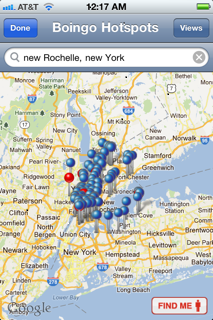
The Blue pins on the map show free hotspots; Red pins indicate Boingo hotspots.

To check where the hotspots are at the site you are traveling to, do the following on your mobile device:

1) Click the Boingo App Logo  2) Click Find Hotspots Near Me  3)  Type the  address, or city and state of the place you’re traveling to  4) When the Blue & Red pins show up, click the View button  5) click the List button  6) click Done, a list of locations will appear on your mobile device screen (see samples below). You can also click on a place to see more details (e.g., whether the hotspot is free).  Note:  Click the images below with your mouse to see a clearer picture.


Check out these great websites below by clicking the links for additional information:

  Boingo Wi-Finder for iPhone Review: Finding Hotspots Everywhere via Boingo Wi-Finder for iPhone Review: Finding Hotspots Everywhere

 ♦ Musings by Annelie Näs  Digital, and more digital – ideas, thoughts and reflections via Boingo Wireless Follow-Up: Special treatment for Blogging customers?.

I hope this is helpful 🙂 !


Are you in a HotSpot?

In the upcoming weeks we are going to have  short bursts of information on what HotSpots are.  For example Boingo Wireless and Boingo Wi-Finder, and where you can buy or download the  free service. Also, we will look at why you would use a paid service instead of a free one.

What is  a HotSpot?

A HotSpot is a site that offers Internet access over a wireless local area network with a router connected to a link to an Internet service provider. Hotspots typically use Wi-Fi technology (this was covered in a earlier post. Check the post listing if you want a detailed description).

Hotspots may be found in coffee shops and various other public establishments throughout much of the developed world. via Hotspot (Wi-Fi) – Wikipedia, the free encyclopedia.

What types of  Internet access services are available to use Hotspots?

Boingo Wireless is a paid service and provides Internet access

Boingo Wi-Finder is a free service and provides Internet access

Below is a brief summary of information found  at Wireless Internet Reviews.  You can click the link  below to read the full description and rating of each service.

Boingo Wireless has a network of Wi-Fi providers worldwide (100,000 hotspots globally).

AT&T has competitive pricing  for monthly Wi-Fi Hotspot subscription packages. It’s a good choice for travelers.

T–Mobile currently operates the fourth largest network in the United States. They have plans available of their network Wi-Fi Hotspots.

Click the link for detailed information: via Best Rated Subscription Hotspot Services | Wireless Internet Reviews

We will have the chance to discuss other findings about HotSpots at the next post.

I hope this is helpful! 🙂

Free SMS – Take advantage of what’s available!

Short Message Service (SMS) is a text messaging service component of phone, web, or mobile communication systems, using standardized communications protocols that allow the exchange of short text messages between fixed line or mobile phone devices. SMS text messaging is the most widely used data application in the world, with 2.4 billion active users, or 74% of all mobile phone subscribers.[citation needed] The term SMS is used as a synonym for all types of short text messaging as well as the user activity itself in many parts of the world. via SMS – Wikipedia, the free encyclopedia.

Some common uses of SMS are things you may already be familiar with,  such as:   Twitter,  Reminders, and Calendar on your phone.

In last week’s post I asked you to think about your 2012 Technology Budget.  Many of you use SMS.  Some plans have unlimited texting, but what are you paying for that service a month? Are you paying separately for each message, or  (estimate for 100 messages @ 5.99/month), or maybe you are paying $30.00/month).  Either way, those dollars add up.  For 2012, think about whether in some instances you could use SMS from one of the free services listed here.  Maybe it will help you cut those costs.  I recently used  Textfree from Pinger.com, and was pleased  with how easy it was to set up an account. I also liked the support that was available. Below is a synopsis of what Pinger thinks about their service.

What is Pinger? Pinger makes texting and talking free. Our market-leading communications products have been downloaded by millions of iPhone, iPod touch, iPad and Android users around the world. Who is Pinger? Pinger is loaded with inventive people who enjoy creating consumer products and services that make a difference in people’s lives. via Pinger makes texting and talking free..

Here’s a tip: After you decide which free SMS service you want to use, tell your text community about your new telephone number.  Ask them to put that number in their Contacts folder so they will recognize your phone number by name when they receive a text from you.

Listed below are other sites I visited.  There is a brief synopsis, of how the service works, and a link at the end of the paragraph that you can click.  The link will take you to the sign up screen.  I hope this is helpful 🙂

♦  ♦  ♦  ♦  ♦  ♦  ♦  ♦  ♦  ♦  ♦  ♦  ♦  ♦  ♦  ♦  ♦  ♦  ♦  ♦  ♦  ♦  ♦  ♦   ♦   ♦   ♦ 

Free Text Messages

1) OnlineTextMessage.com allows free text messaging. You can send free SMS text messages to anyone with a SMS or text message enabled mobile phone. You no longer have to pay to send quick SMS or text messages as long as you have access to the Internet. All major carriers are supported: Verizon, AllTel, AT&T, Cingular, TMobile, Sprint, SunCom, and Nextel. Please bookmark our site and make us your home for free online text messaging and SMS services. You can also add it to your MySpace Profile or Google! Bookmark Us.via Free Text Messaging – Send Free Text Messages.

2) Text’em The messages that you send and receive using our website are free. Check with the recipients of the text messages, is it free for them?

Regular rates apply, please check with the recipients before sending a text message to them. You can send text messages to any of the major United States cellular services. Click the link.

via Free Text Messaging – Send and Receive Free Text Messages – Text’em.

3) MobiClient
Broadcast One Message to Many Recipients.  Need to notify multiple co-workers of a change in plan? With MobiClient’s unique Broadcast feature, you can send one message to all those recipients at once.Learn More

via MobiClient – Free SMS Text Messaging from PC to Mobile Phone Software Online Service. Free download Sending SMS. –.

There are many of these free SMS services.  If you have one that you use and like, don’t hesitate to share.  See you at the next post!  🙂

For Older Workers: How To Update Your Computer Skills

What is your computer skills IQ?

Being an older worker does have some competitive advantages.  It also brings valuable resources to the working environment. However, as older workers we should  prepare to hone our job working skills for today’s job market. Many office environments use Microsoft applications. Word, Excel, PowerPoint, and Outlook e-mail are just some of the programs used by office professionals today.

I have come to rely on some very helpful sites to aid me in acquiring competitive skills as an office professional. To support you in finding resources fordeveloping new skills, or upgrading your skills, I have connected my Blog to some of the best HELP around for developing computer skills.

Those sites are listed at the Blogroll on the right side of the screen. All you have to do is click the link, and you will be able to explore what the website has available to help you become proficient or even an expert using various software skills.

Below is a brief description of what those sites can offer.

Certiport.com

Certiport offers individuals current and relevant digital skills and credentials for the competitive global workforce. These solutions include the official Microsoft Office certification programs, the Microsoft Technology Associate certification program, the Adobe® Certified Associate certification program, the CompTIA Strata™ IT Fundamentals, the Intuit QuickBooks Certified User certification program and the Certiport Internet and Computing Core Certification (IC³®), delivered by more than 10,000 Certiport Centers worldwide via Certiport | Home – Certify to Succeed.

ShaunaKelly.com

I have found this word processing help the best of the many sites I visit frequently.  If you are a beginner, intermediate, or advanced WORD user, I believe you will find this is a very useful resource.  Just click the link on my Blogroll to use the Word help.


Your body posture is important!

ERGONOMICS I have covered the reasons for having the correct body language at the computer.  Some of you may have already suffered from the stress of working at a computer device all day.  If you are new or an experienced computer user, it is important to have the correct posture when working. If you can’t manage the best posture, you may at least find the exercises provided at this site will help you with relieving some discomforts.  Just click the body language link on my Blogroll.

I hope this is helpful.  See you at the next Post!   🙂

A Tribute to Steve Jobs

I should not  write my post this week without first acknowledging the passing of Steve Jobs.  I have often expressed my delight with the ‘i devices. However, what I believe is most extraordinary about Steve Jobs  is that he connected an entire universe with his inventions. All over the world people enjoy Apple products.  He was Apple’s Rock Star.  Every time he brought us something new, the response was phenomenal!  We couldn’t wait to buy it, learn to use and enjoy it.  And, the newest invention was immediately at the top of the computer charts! 🙂

Steve Jobs infused his creations with love and care, and we were the recipients of that love, and care.  So, as I think about Steve Jobs, I’m feeling thankful that I have experienced his passion, his genius, his drive for perfection through his inventions.  Yes, there are other inventions, but the way I see it he was the first to take the computer experience and convert it to personal entertainment with a business component.
He engendered diversity on a grand scale:  young, old, various cultures, languages, professions.  The list goes on and on. His influences and his footprints will remain forever on our universe.

Thank you, Steve Jobs, for helping us to connect worldwide through your visions!

Some people positively change the Universe !

Why I Blog

Thoughts from: @autocreate740

I invited someone to look at my Blog recently, just to tell him that I am doing something new.  He happens to be somewhat computer literate. When I heard back from him, he wanted to know what he was looking for.

Ha!

After receiving that response, I wondered how many Bloggers are out there, who are feeling lonely, and become discouraged about blogging because NO One is reading, or viewing, let alone, commenting, or ‘liking’ their Blogs.

I’ve been blogging since May 2011.  As of October 1, I will have started my 6th month, so it seems right to check what I am doing at Tech4Boomers.com, and to confirm for myself what I think I’m doing.

I have been interested in technology, after leaving a career in film and television, for about 25 years now.  My true ‘likes’ are Outlook Email, and oddly enough,  Word Processing.  I am an iPhone/iPad ‘groupie’. I also dabble in PowerPoint. I Love Apps!

Blogging is my newest avocation; I enjoy learning about this new (for me) technology. It’s a wonderful challenge to acquire a new computer skill, and it seems to be very popular with young people, and that’s always good.  I mean staying in touch with the young people; they are our future. 🙂

I am a Baby Boomer.  Most of my friends are trying to get away from the computer, and would rather not learn yet another thing that involves a computer challenge.  I truly like WordPress.com. And, that I was able to start blogging for free! was truly a treat.  🙂

Blogging provides a way for creativity on my own terms.  I can cover the topics I find interesting, put my artwork in, say it the way I feel I want to, and that gives me a wonderful feeling of freedom.

Blogging keeps me informed and connected with an outside world.  I find it intriguing to read what others are thinking.  Blogging is a universal ‘connection’ tool.

◊ ◊ ◊ ◊ ◊ ◊ ◊ ◊ ◊ ◊ ◊ ◊ ◊ ◊ ◊ ◊ ◊ ◊ ◊ ◊ ◊ ◊ ◊ ◊ ◊ ◊ ◊ ◊ ◊ ◊ ◊ ◊

What is Tech4Boomers designed to do?  Here’s what I think briefly:

It’s an electronic newsletter, where, once a week I post something I think  is worthwhile knowing. It’s also a reference guide for me 🙂

It attempts to simplify technical issues for my generation, and younger people who want to learn something about Twitter, Linkedin, WiFi, 3G, iPhones, iPads,  Blackberry phones, Apps, and various other computer related topics.

It’s designed to give a knowledge  level to those who are not ‘computer savvy’, but would like to know more.

It’s designed to help others when possible.

It’s fun for me!

In addition to providing a platform for me to improve my skills overall, and blogging skills in particular, this activity allows me to introduce friends and family to the blogging experience:  What is it? How does it work? What is its reach, and knowing is it a worthwhile undertaking.

So here’s the conclusion: I’ve decided to continue! 🙂  I hope this was helpful in further clarifying what Tech4Boomers is about.

See you at the next post !

ZAAG Keyboard Function Keys Defined

Hmm ZAAG Keyboard Function (F) Keys

I trust those ZAAG Keyboard demonstrations that were in last week’s Post were helpful.

Now that you have had an opportunity to see the ZAAG  keyboard YouTube demonstrations, I thought I would give you a short description of the function keys for your reference.  These shortcuts can save you a lot of time when you are working on your iPad.


I hope this is helpful 🙂

Do you know how to use your ZAAG/Logitech iPad Keyboard ?

How is that ZAAG keyboard working for you?

How many of us have those wonderful keyboards for our iPad, but haven’t a clue what some of the keys are for? Well, I am here to confess that I was one of that great grey number. However, you know me by now, I am ALWAYS searching for  HELP!, and  in my recent ‘cyber-travels‘ I discovered a few demos on YouTube, which I would like to  share with you.  I hope you will enjoy learning about all the things these ZAAG keyboards are capable of doing.

Although some of  these are iPad2 demos, I think they will be helpful  for all iPad users 🙂

Click here to learn about the function keys on the top row:  ZAGGmate™ Setup – How To Pair & Function Keys Explained – YouTube.

This one has music, so you may want to turn your volume on (and low). Click  here: Hands On Demo With the Logitech Keyboard Case for iPad 2 by ZAGG – YouTube.

See how you like this one 🙂

Stick with the demo.  There may be a commercial before it begins.  Click here for  demo: Logitech Keyboard Case for iPad 2 Unboxing & Overview – YouTube.

I hope this is useful.  See you at the next post 🙂