Eye Ergonomics

I am certain that many of you spend hours working on  your desktops, laptops, mobile phones, then there is  Twitter, Facebook, Email,  Excel, Word, APPS, etc. etc.  Have you considered that all of this constant viewing of computer screens during the many hours of a given day  is having an impact on the ability for us to focus with our eyes?  I know I have not been thinking about the strain, although I have suffered from headaches. I have also had blurred vision during the course of the day, along with  neck and back pain.  That’s why I was interested to learn about a New York Times article by Mickey Meece, which offers solutions for eyestrain caused by computers. via Easing Eye Strain With the Right Lenses – NYTimes.comAfter reading the article, I thought it would be helpful for you to know what else I found out, so here is my synopsis.  As always you can click on the links provided for more details.

Computer vision syndrome (CVS) is a temporary condition resulting from focusing the eyes on a computer display for protracted, uninterrupted periods of time. Some symptoms of CVS include headaches, blurred vision, neck pain, redness in the eyes, fatigue, eye strain, dry, irritated eyes, double vision, polyopia, and difficulty refocusing the eyes. These symptoms can be further aggravated by improper lighting conditions (i.e. glare or bright overhead lighting) or air moving past the eyes (e.g. overhead vents, direct air from a fan).via Computer vision syndrome – Wikipedia, the free encyclopedia. Presbyopia is a condition where the eye exhibits a progressively diminished ability to focus on near objects with age…The first signs of presbyopia – eyestrain, difficulty seeing in dim light, problems focusing on small objects and/or fine print – are usually first noticed between the ages of 40 and 50 . . .via Presbyopia – Wikipedia, the free encyclopedia.

What can you do about eye strain?

In the article by Mickey Meece he discusses special purposes glasses which enhance your ability to see the computer with a sharper focus.

Here’s a list of suggestions I found at the Ergonomics website:
How To Prevent or Treat Eye Strains?

  • Take breaks by getting away from the computer desk for a few minutes
  • Eyes need to focus at different distances from time to time. It’s a good idea to follow the “20/20 rule” — every twenty minutes, look twenty feet away for twenty seconds
  • Every 20 minutes, blink 10 times by closing your eyes as if falling asleep (very slowly). This will help rewet your eyes.
  • Blinking is very important when working at a computer; it rewets your eyes to avoid dryness and irritation
  • Massaging the temples with your eyes closed for a minute may alleviate the symptoms
  • It is recommended that the viewing distance be around 45 inches away at horizontal eye level or 35 inches away with a 30-degree downward gaze angle
  • The general rule is to keep viewed material as far away as possible, provided it can be read easily. There is no such thing as sitting too far away from the screen as long as you can comfortably read what is on the screen! And don’t forget that you can increase the font on the screen by zooming into the webpage, document or changing the resolution on the screen.
  • keep viewed objects at about the same distance if you have to look back and forth a lot eg. Reading paper documents and looking at the screen to perform a task
  • Looking downward means more of the eye surface is covered by the eyelid, and two other things happen: the eyes unconsciously blink more, and they produce more lubrication

Computer glasses put the optimum lens power for viewing your computer screen right where you need it for a clear, wide field of view without the need for excessive focusing effort or unhealthful postures. The simplest computer glasses have single vision lenses.

a. This lens power relaxes the amount of accommodation required to keep objects in focus at the distance of the computer screen and provides the largest field of view

b. The lenses can be tinted to remove reflections of light from the front and back surfaces of your lenses that can cause eye strain. They also reduce glare caused by harsh overhead lighting found in many office environments. Read more about these unique computer glasses via Computer Eye Strain – Eyestrain.

I hope this is helpful! 🙂


The Scoop from IE about Online Privacy

Many of us are  in a quandary, and at our wits’ end trying to figure out what to do about this online privacy thing.  I mean can we control what companies find out about us?  If yes, what does that do to our ability to surf online for information?  Does it put us as a disadvantage because we setup controls?  In fact, an article appeared in PC World By John Ribeiro, IDG News Feb 21, 2012, which reports what Google says about how newer cookie-based features are affected by Microsoft’s IE.  One example given was “Like” buttons in Facebook. Check out the full article via Google Says IE Privacy Policy Is Impractical in Modern Web | PCWorld.

Let’s review what P3P is: The Platform for Privacy Preferences Project (P3P) is a protocol allowing websites to declare their intended use of information they collect about web browser users. Designed to give users more control of their personal information when browsing, P3P was developed by the World Wide Web Consortium (W3C) and officially recommended on April 16, 2002. Development ceased shortly thereafter and there have been very few implementations of P3P.  Microsoft Internet Explorer is the only major browser to support P3P.
via P3P – Wikipedia, the free encyclopedia.

It’s all very complicated! We covered what Google and Mozilla are doing about the online privacy concerns for users.  Below is a short summary of the highlights I thought you might want to know about , which Internet Explorer (IE) has posted on their Blog.  I urge you to use the links provided in this post to check out the information when you have time to read it for a thorough understanding, and how it may (or may not) affect you.

Highlights:

  1. Is Google circumventing the privacy preferences of IE? Yes. via Google Bypassing User Privacy Settings – IEBlog – Site Home – MSDN Blogs
  2. What does IE recommend to their users how to protect their privacy? One example IE gave is that IE9 has tracking protection which can protect you from Google.
  3. IE blocks third party cookies by default unless the site has a P3P Compact Policy Statement.
  4. IE has a Tracking List available for IE9 users.  Click this link to learn more via Tracking Protection – Microsoft Windows.

♦  ♦   ♦   ♦   ♦    ♦   ♦   ♦  ♦   ♦   ♦   ♦    ♦   ♦   ♦  ♦   ♦   ♦   ♦    ♦   ♦  

When you finish reading up on all the things you can do to protect yourself,  read the article by Karl Bode at the link provided below.  His comments about “snoopvertising” will be a reality check via Press Realizing New Privacy Bill of Rights Won’t Do Much – ‘Do Not Track’ Doesn’t Mean What You Think it Means | DSLReports.com, ISP Information.

Perhaps what would be useful here is a quote I found from 1999!

♦  ♦   ♦   ♦   ♦    ♦   ♦   ♦   ♦   ♦   ♦   ♦   ♦   ♦  ♦   ♦   ♦   ♦   ♦   ♦   ♦   ♦

Polly Sprenger Email 01.26.99

The chief executive officer of Sun Microsystems said Monday that consumer privacy issues are a “red herring.”  “You have zero privacy anyway,” Scott McNealy told a group of reporters and analysts Monday night at an event to launch his company’s new Jini technology. “Get over it.” via Sun on Privacy: ‘Get Over It’.

I hope this is helpful ! 🙂

The Scoop About Online Snooping

Just when you thought you understood how to handle the privacy protection issues, they pull us right back in. That’s why many of us are worried about how Google’s new privacy policy will affect our privacy online, and what we can do to have a say about how information is currently collected about us, and how it is manipulated.  Last week we delved into the use of  various tools provided by Google to allow us to put a stop to some of the information being collected about us in order for Google and other ‘first party(cookie) sites”  like Amazon to sell Ads.  For example,  consumers may not know that when they  go directly to first party sites (e.g. Google, Amazon) data can still be collected on them before they are given the option to “Opt-Out”.  It appears that the “Opt-Out” option works best with third party sites. Read more about how to Opt-Out and what controls you really have  at:  Network Advertising Initiative.

♦ ♦ ♦ ♦ ♦ ♦ ♦ ♦ ♦ ♦ ♦ ♦ ♦

I have listed some of  the topics reviewed by  Associated Press via Google’s new privacy policy: 6 key issues you need to know | NJ.com.

  1. Can Gmail, Google Plus, YouTube, users prevent personal data from being collected?
  2. Which Google services are covered by the privacy policy?
  3. What role does the U.S. Federal Trade Commission have in overseeing Google’s treatment of personal information?

♦ ♦ ♦ ♦ ♦ ♦ ♦ ♦ ♦ ♦ ♦ ♦ ♦

And, do not forget to check out what Mozilla’s Firefox has available to avoid tracking  in their new release.

Firefox for Android includes the Do Not Track privacy feature in this release, making Firefox the first browser to support Do Not Track on multiple platforms. Mozilla created Do Not Track to give users more control over the way their browsing behavior is tracked and used on the Web. The feature, which lets users tell websites that they wish to opt-out of online behavioral tracking, is now easier to find in Firefox Preferences. via Mozilla Delivers New Version of Firefox – First Web Browser to Support Do Not Track on Multiple Platforms | The Mozilla Blog.

I hope this is helpful 🙂

Privacy Online? What a Concept!

I am sure you heard about the recently published articles regarding online privacy.  How sure can we be that the people who are watching us, are people we want to share our views and Internet behavior/habits with?  I think this is something we want to have control over, but, how much can we control?

* * * * * * * * * * * *  * * * *  * *

Jennifer Valentino-DeVries of the  Wall Street Journal reported on this topic in a February 16, 2012 article, ‘How Google Tracked Safari Users’.  The article discusses the use of “cookies’ being stored in a person’s computer to track online activities. Many online ‘savvy’ users are well aware of this common practice; however, Apple users thought Apple’s Safari Web Browser was defaulted to block this type of tracking.  You can get the full article details via  How Google Tracked Safari Users – Digits – WSJ

I wondered what others were thinking about this, and found some excellent points made by Alan Thompson, Principal Consultant, Marketing Analytics – July 29, 2011 article,  Is online privacy a realistic expectation?  Thompson makes some excellent points; such as he says Users benefit from free APPS , and without tracking the owners of these APPS can’t provide meaningful targeting for advertisers. In other words, without ads, charges would be required for the Free Apps users load on their devices.  He points out that we (users)  do have the choice to read and accept terms and conditions.  Many of  us often just ‘accept’ the terms without reading what they are because the benefits to us outweigh the privacy risks. We want to use these free Web Apps and services and have free access to information, therefore our privacy could be compromised.  In 2011 Thompson stated that the focus on mobile apps and privacy were not new, and that data aggregators have been collecting information on households for many years.  The first data aggregator that came to my mind was Nielsen reports.  You can read more about the various ways data is used in the article via Is online privacy a realistic expectation? | Tellabs Blog | Telecom News & Industry Trends | Tellabs News.

* * * * * * * * * *  * * * *  * *

 As consumers of these ‘Free APPS, Services and Information’, what can we do to be creative in protecting ourselves from these marketing strategies?
♦ Google has made a serious effort to find solutions for the privacy concerns of their users and provides  some ways to protect yourself. These are some of the tools available to you:  Encrypt searches, use Google Chrome, check Web History controls, use Gmail Chat “off the record”, Opt-out-install of Google Analytics Personalization.

Make sure to visit Google’s Dashboard, via Privacy tools – Google, which has the guidelines for changing your privacy settings.

You can make a proactive choice in handling how some of your online habits are evaluated :).  I hope this is helpful.

APP Therapy?

As Benedict Carey writes in Science Times . . . a new generation of apps may soon offer psychotherapy on the go. In the past few years, researchers have been testing simple, video-game-like programs aimed at relieving common problems like anxiety and depression. These recent results have been encouraging enough that investigators are now delivering the programs on smartphones — therapy apps, in effect, that may soon make psychological help accessible anytime, anywhere, whether in the grocery store line, on the bus, or just before a work presentation.via Coming to Your Smartphone: Therapy Apps – NYTimes.com.

* * * * * * * * * *

These days, many of us complain about the 24 hour response lives we are leading due to Smartphones, iPads, Laptops, Twitter, Facebook, Email, Internet, the SOCIAL MEDIA THING!  We want a breakNow it seems, even our relaxation and therapy will  come from a computer!  The ‘Relaxation Response‘ is now available in various  APPS.  No Kidding!

The Relaxation Response,  a term coined by Herbert Benson in a book of the same name, where he describes his research into the effects of meditation via Relaxation response – Wikipedia, the free encyclopedia.

I am eager to see where this will lead us in the future since it seems  there is a serious discussion about the potential help these APPS may offer. The following excerpt is a brief description of what to expect. You can click the link at the end of this short description to read the full details.

♦ Objective: This exploratory study examined the potential of mobile phone technologies to broaden access to cognitive behavioral therapy techniques and to provide in-the-moment support. ♦ Methods: We developed a mobile phone application with touch screen scales for mood reporting and therapeutic exercises for cognitive reappraisal . . . and physical relaxation. via JMIR-Mobile Therapy: Case Study Evaluations of a Cell Phone Application for Emotional Self-Awareness | Morris | Journal of Medical Internet Research.

* * * * * * * * *

Android cell phone users will want to take this opportunity to check out some of the APPS already on the market to help you with relaxation techniques available for Android cell phones.  Some favorites appear below, and are available, with many others at this  link  http://www.androidfreeware.net/tag-relaxation.html

Rainy Jungle – A rainy jungle view over a river and a stimulating hail of the raindrops for your relaxation or deep sleep.
Guide to Psychotherapy – Learn The Basics About The Healing Power Of Psychotherapy.
* * * * * * * * *
iPhone and iPad users can find a great choice for meditation and relaxation APPS by clicking the links below.
I hope this is helpful 🙂   PEACE!


Phone Security

Everywhere lately I am reading about how to protect one’s identity from phone loss or theft.  In recent weeks it is even more so.  This topic is without doubt something we all need to be aware of, and should do  something about.  Are you at risk of putting your identity in jeopardy because you have not taken the steps to add restrictions on your phone?

What are your risks today?  Have you ever lost your phone?  Do you think security on your device is important?  Don’t think so ? Below is a small part of an article that appeared in the New York Times recently.  I urge you to click on the link after the brief summary to get the full story.

Chuck Bokath would be terrifying if he were not such a nice guy. A jovial senior engineer at the Georgia Tech Research Institute in Atlanta, Mr. Bokath can hack into your cellphone just by dialing the number. He can remotely listen to your calls, read your text messages, snap pictures with your phone’s camera and track your movements around town — not to mention access the password to your online bank account. via Protecting a Cellphone Against Hackers – NYTimes.com.

Enough said?  Below are  recommendations  on how to begin protecting yourself from compromising the safety of your personal information.  In the New York Times article one of the smartphone security companies  mentioned is Lookout, Inc.  Check out the information below and get started with protecting your cyber identity.  🙂

Award-Winning Security That’s Easy to Use Your smartphone is vital to your work and everyday life. Lookout provides award-winning security to protect you from viruses, malware and spyware, the ability to backup and restore your data, and tools to help locate lost or stolen phones. Lookout’s unique cross-platform, cloud-connected applications are designed to be lightweight and efficient while delivering the best protection possible. via Smartphone Security | Mobile Device Security for Smartphones.

Apple iPhone and iPad users can checkout the 2 links below

Protecting and Recovering Your iPhone and iPad from Loss and Theft | Security Generation.

Frequently Asked Questions About Find My iPhone (and iPad) | Security Generation.

♦  Android phone users may want to check out how to protect their phones with Norton’s beta app

Norton Mobile Security Android security appSmartphones hold a lot of valuable data: Text messages, e-mail, and even credit card numbers can reside on the device, where they’re easily accessed. If you lose your phone, you run the risk of having your identity stolen. Sure, you can set up a lock pattern, but we have seen such measures circumvented in the past.

Symantec’s Norton Mobile Security (beta) allows you to remotely lock and wipe your phone by text message, so that whoever finds it can’t immediately go on a shopping spree in the Android Market with your money. You can even lock down the SIM card so that a thief can’t swap it out to another phone. Beyond that, Norton permits you to block calls and text messages, as well as to scan your phone for malware. Although the program is still in beta until the end of the year, Norton Mobile Security is a superb choice for anyone who wants complete cell phone protection. via Protect Your Android Phone With Security Apps | PCWorld.

I hope this is helpful 🙂


ACKNOWLEDGEMENT

I cannot write my post today before I acknowledge the recent reports about the manufacturing of Apple products in China.  Even more to the point,  I do not think that any one of the many Apple customers in the United States was not troubled by the report of how these products, we’ve come to love and use, are being made for our use and entertainment.

Human cost does matter.  In this country where we live to enjoy all sorts of labor laws to protect the human cost value from capitalism, we cannot close our minds and eyes to this recent, startling revelation.  We should further evaluate and listen, but we cannot ignore what is alleged.

In 1904 the National Child Labor Committee began its mission of advocating for child labor laws in the United States.  That was one hundred eight years ago. That’s only one issue.

Surely, as citizens, parents and ultimately as consumers of the products, which Apple and other companies either manufacture, or contract with others to manufacture, we will be vigilantly watching for what plans and solutions to this multi-headed hydra are proposed and implemented.  The news is disturbing; the answer is probably not simple.

There is clearly more to come on this subject.

Using HotSpots … Guidelines…

At the last post we offered some suggestions for using HotSpot software.  Boingo WiFi and Wi-Finder appear to be very popular Mobile Apps. Both iPad and Android  have this App available for their mobile devices.  Boingo received  great reviews, both for ease of use and customer service.

Mobile applications, also called mobile apps, are software applications, usually designed to run on smartphones and tablet computers. They are available through application distribution platforms, which are typically operated by the owner of the mobile operating system, such as the Apple App Store, Android Market, and BlackBerry App World. Some apps are free, and others have a price.via Mobile apps – Wikipedia, the free encyclopedia.

Here are some of the details that caught our attention.  We suggest you use the links provided at the end of this post to get a complete review and guidance for each App.

When traveling to a new place check out the Wi-Fi access before you go.  This may help you decide on a hotel site, or a particular hotel (see below).

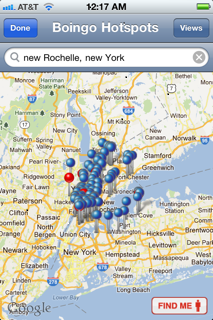
The Blue pins on the map show free hotspots; Red pins indicate Boingo hotspots.

To check where the hotspots are at the site you are traveling to, do the following on your mobile device:

1) Click the Boingo App Logo  2) Click Find Hotspots Near Me  3)  Type the  address, or city and state of the place you’re traveling to  4) When the Blue & Red pins show up, click the View button  5) click the List button  6) click Done, a list of locations will appear on your mobile device screen (see samples below). You can also click on a place to see more details (e.g., whether the hotspot is free).  Note:  Click the images below with your mouse to see a clearer picture.


Check out these great websites below by clicking the links for additional information:

  Boingo Wi-Finder for iPhone Review: Finding Hotspots Everywhere via Boingo Wi-Finder for iPhone Review: Finding Hotspots Everywhere

 ♦ Musings by Annelie Näs  Digital, and more digital – ideas, thoughts and reflections via Boingo Wireless Follow-Up: Special treatment for Blogging customers?.

I hope this is helpful 🙂 !


Are you in a HotSpot?

In the upcoming weeks we are going to have  short bursts of information on what HotSpots are.  For example Boingo Wireless and Boingo Wi-Finder, and where you can buy or download the  free service. Also, we will look at why you would use a paid service instead of a free one.

What is  a HotSpot?

A HotSpot is a site that offers Internet access over a wireless local area network with a router connected to a link to an Internet service provider. Hotspots typically use Wi-Fi technology (this was covered in a earlier post. Check the post listing if you want a detailed description).

Hotspots may be found in coffee shops and various other public establishments throughout much of the developed world. via Hotspot (Wi-Fi) – Wikipedia, the free encyclopedia.

What types of  Internet access services are available to use Hotspots?

Boingo Wireless is a paid service and provides Internet access

Boingo Wi-Finder is a free service and provides Internet access

Below is a brief summary of information found  at Wireless Internet Reviews.  You can click the link  below to read the full description and rating of each service.

Boingo Wireless has a network of Wi-Fi providers worldwide (100,000 hotspots globally).

AT&T has competitive pricing  for monthly Wi-Fi Hotspot subscription packages. It’s a good choice for travelers.

T–Mobile currently operates the fourth largest network in the United States. They have plans available of their network Wi-Fi Hotspots.

Click the link for detailed information: via Best Rated Subscription Hotspot Services | Wireless Internet Reviews

We will have the chance to discuss other findings about HotSpots at the next post.

I hope this is helpful! 🙂

Free SMS – Take advantage of what’s available!

Short Message Service (SMS) is a text messaging service component of phone, web, or mobile communication systems, using standardized communications protocols that allow the exchange of short text messages between fixed line or mobile phone devices. SMS text messaging is the most widely used data application in the world, with 2.4 billion active users, or 74% of all mobile phone subscribers.[citation needed] The term SMS is used as a synonym for all types of short text messaging as well as the user activity itself in many parts of the world. via SMS – Wikipedia, the free encyclopedia.

Some common uses of SMS are things you may already be familiar with,  such as:   Twitter,  Reminders, and Calendar on your phone.

In last week’s post I asked you to think about your 2012 Technology Budget.  Many of you use SMS.  Some plans have unlimited texting, but what are you paying for that service a month? Are you paying separately for each message, or  (estimate for 100 messages @ 5.99/month), or maybe you are paying $30.00/month).  Either way, those dollars add up.  For 2012, think about whether in some instances you could use SMS from one of the free services listed here.  Maybe it will help you cut those costs.  I recently used  Textfree from Pinger.com, and was pleased  with how easy it was to set up an account. I also liked the support that was available. Below is a synopsis of what Pinger thinks about their service.

What is Pinger? Pinger makes texting and talking free. Our market-leading communications products have been downloaded by millions of iPhone, iPod touch, iPad and Android users around the world. Who is Pinger? Pinger is loaded with inventive people who enjoy creating consumer products and services that make a difference in people’s lives. via Pinger makes texting and talking free..

Here’s a tip: After you decide which free SMS service you want to use, tell your text community about your new telephone number.  Ask them to put that number in their Contacts folder so they will recognize your phone number by name when they receive a text from you.

Listed below are other sites I visited.  There is a brief synopsis, of how the service works, and a link at the end of the paragraph that you can click.  The link will take you to the sign up screen.  I hope this is helpful 🙂

♦  ♦  ♦  ♦  ♦  ♦  ♦  ♦  ♦  ♦  ♦  ♦  ♦  ♦  ♦  ♦  ♦  ♦  ♦  ♦  ♦  ♦  ♦  ♦   ♦   ♦   ♦ 

Free Text Messages

1) OnlineTextMessage.com allows free text messaging. You can send free SMS text messages to anyone with a SMS or text message enabled mobile phone. You no longer have to pay to send quick SMS or text messages as long as you have access to the Internet. All major carriers are supported: Verizon, AllTel, AT&T, Cingular, TMobile, Sprint, SunCom, and Nextel. Please bookmark our site and make us your home for free online text messaging and SMS services. You can also add it to your MySpace Profile or Google! Bookmark Us.via Free Text Messaging – Send Free Text Messages.

2) Text’em The messages that you send and receive using our website are free. Check with the recipients of the text messages, is it free for them?

Regular rates apply, please check with the recipients before sending a text message to them. You can send text messages to any of the major United States cellular services. Click the link.

via Free Text Messaging – Send and Receive Free Text Messages – Text’em.

3) MobiClient
Broadcast One Message to Many Recipients.  Need to notify multiple co-workers of a change in plan? With MobiClient’s unique Broadcast feature, you can send one message to all those recipients at once.Learn More

via MobiClient – Free SMS Text Messaging from PC to Mobile Phone Software Online Service. Free download Sending SMS. –.

There are many of these free SMS services.  If you have one that you use and like, don’t hesitate to share.  See you at the next post!  🙂