Keeping up with tech news…

iPhone/iPad

 ♦ Periodically tech4boomers highlights articles that have tips, tricks and useful information.  This week we want to call your attention to an article by Katherine Boehret, of the Wall Street Journal, which covers iPhone and iPad things you should get to know. Don’t forget to click the link provided for the details.  A sample of what she covers is: how to directly access apps, how to Tap to scroll up, keyboard shortcuts, how to take screenshots, how to swipe search.  In all she covers ten things you will want to know.  Click this link for the article: via Ten Tips and Tricks Every iPhone and iPad User Should Know – WSJ.com.

———————————

Choosing Computer Monitors

The next article we think you will want to read is by Kate Murphy at the New York Times, Personal Tech section.  This article covers what you should consider when buying a computer monitor.  Since we spend sooo much time these days looking at computer screens, it’s important to know why you choose one monitor versus another, and how important  the specs are. Ms. Murphy explains resolution, and how the picture elements (pixels) are supposed to give a sharper picture quality.  However, that may be true only up to a point.  Murphy checks with a retinal neuroscientist for his opinion.  In addition, contrast ratio is explained. But, after all of this discussion it turns out “Response time is the first thing to look at”. Ergonomics play an important role when choosing a monitor. How monitor ergonomics affects eye, back, and neck strain is also reviewed. All said, this is an important article.  Read more by clicking this link: via Things to Consider When Buying a Monitor – NYTimes.com.

I hope this is helpful 🙂

Find it …Keep it?

How many of us have experienced the loss of an unreturned phone?  Recently,  I was wondering what goes through any person’s mind who finds a phone belonging to someone else, and decides to keep it, or sell it.  What are their thoughts about keeping something that is clearly an important personal item of someone else?  Is it that they relate to the ancient Roman law, Finders, Keepers?

Finders, keepers is the adage with the premise that when something is unowned or abandoned, whoever finds it can claim it. This idiom relates to an ancient Roman law of similar meaning and has been expressed in various ways over the centuries..via Finders, keepers – Wikipedia, the free encyclopedia.

Have you ever had the opportunity to return something of value to someone else?  What makes a person do his/her best to return an item to the owner? Is it moral conviction/training value within a person?

Honesty refers to a facet of moral character and denotes positive, virtuous attributes such as integrity, truthfulness, and straightforwardness along with the absence of lying, cheating, or theft. “Honesty is the best policy.” — William Shakespeare, Mark Twain, Steve Landesberg and Tony Farrugia. all said this saying.via Honesty – Wikipedia, the free encyclopedia

The next time you find yourself in this situation, below are some guidelines and links to websites for details on what you can do if you believe that “honesty is the best policy”

If you find a locked iPhone

Since you can’t unlock the phone, you can’t poke around… But you do have options.

  • The first is to hold down the Home button for a few seconds, which may—depending on the owner’s phone settings—trigger either Siri or Voice Control. In either case, when prompted by the beep, say, “Call ICE.” If the phone’s owner has an ICE contact as described above, the phone will either start calling that person right away or ask you to clarify which number to call (as in, Home, Mobile, Work, etc). If you luck out and connect with the emergency contact, you can explain the situation to that person.via What to do if you find a lost iPhone | Macworld.

Call the police

  • You can also turn to your local police department. Manalapan, N.J., police officer Joe Felicia told Macworld that after you turn a found phone into the police, “if the owner responds to the police station and can identify the phone, the police department will return the phone to the owner. If not, the phone will go in a bin with hundreds of other phones.”

Felicia said that he sees “no problems” with trying to search the phone to locate the owner, if “it is being done in good faith.” The one catch: “If you are searching the phone and you stumble onto something that is obviously illegal… the phone would go directly to the police.”via What to do if you find a lost iPhone | Macworld.

Find the owner of a lost cell phone

  • Power the phone off. This can be done by holding down the power button on the phone. The power button is usually on the right side of the phone, toward the bottom. On some phones the power button is highlighted in red..
  • Turn the phone back on by pressing the power button again. You may need to hold the button for a second for it to power back on..
  • Watch the screen to discover the service provider. Once you know the service provider, contact the company’s customer support phone number. Many phone companies’ websites have “Contact Us” sections where you can find this number…
  • Answer questions from the representative the best you can. The agent may ask for the phone’s serial number and the type and style of the phone. If you are not sure of these answers, the support agent can help you locate information. The information you provide should be able to give the agent the information he needs to find the owner.
  • You may be asked to bring the phone to a local store or mail the phone back with a prepaid envelope the company sends you. via How to Locate Cell Phone Owners | eHow.com.

I hope this is helpful 🙂

Green Wi Fi in New York

Who doesn’t remember the mild-mannered avatar Clark Kent using the iconic telephone booths to change into Superman, and then flying off to ‘protect’ Metropolis !  Those were the good old days!

Well let’s Flash Forward to our Metropolis, New York City, where the telephone booth will now be used to enhance the lives of its citizens by providing Free Wi-Fi… Read on…

Let’s review what Wi-Fi is againWi-Fi internet is a way of accessing the internet using a wireless network through an wireless access point. This replaces the traditional use of using a networking cable to access the internet. Read More »via Ask.com – What’s Your Question?.

 New Yorkers and visitors are now able to connect free-of-charge using their smartphones, tablets, and other WiFi-enabled devices. Access is currently available at 10 locations, with additional hotspots to follow in the coming months.  via NYC Digital – News.

The wireless signal of the pay phone booths will span an 100 to 200 foot radius and the network will appear as “Free WiFi” or “NYC Free Public WiFi” on phones, laptops, tablets, and other WiFi devices.

 The network isn’t password protected, but when you launch your browser, you will be required to agree to terms and conditions before surfing the web. Read More via New York City Pay Phone Booths Now Free WiFi Hotspots – ABC News.

LOCATIONS:  Manhattan 402 West Broadway (at Spring Street); 458 Seventh Avenue (at 35th Street); 410 Madison Avenue (at 48th Street); 1609 Broadway (at 49th Street); 1790 Broadway (at 58th Street); 230 West 95th Street (at Broadway).Brooklyn 545 Albee Square; 2 Smith Street (both at the Fulton Street Mall).Queens 30-94 Steinway Street (at 31st Avenue). Read More via City Begins Wi-Fi Pilot Program in 10 Phone Booths – NYTimes.com.

Click for Maps:  via City of New York – NYC Public WiFi Hotspots – foursquare.

HOW TO USE PHONE BOOTH Wi-Fi

Look for a phone booth that says WiFi or Free WiFi labelled on it.

Stand within 200 feet of the WiFi-enabled phone booth.

On your phone or laptop, connect to either of the wireless networks, “Free WiFi” or “NYC Free Public WiFi.”

Upon launching your browser, agree to the terms and conditions.

Go on the Internet, email, stream, or do anything else Internet-related.

For more details click link: via NYC phone booths will be free WiFi Hotspots – How to connect to NYC WiFi phone booth? — New York Computer Help Blog.

I hope this is helpful 🙂

Phone Security

Everywhere lately I am reading about how to protect one’s identity from phone loss or theft.  In recent weeks it is even more so.  This topic is without doubt something we all need to be aware of, and should do  something about.  Are you at risk of putting your identity in jeopardy because you have not taken the steps to add restrictions on your phone?

What are your risks today?  Have you ever lost your phone?  Do you think security on your device is important?  Don’t think so ? Below is a small part of an article that appeared in the New York Times recently.  I urge you to click on the link after the brief summary to get the full story.

Chuck Bokath would be terrifying if he were not such a nice guy. A jovial senior engineer at the Georgia Tech Research Institute in Atlanta, Mr. Bokath can hack into your cellphone just by dialing the number. He can remotely listen to your calls, read your text messages, snap pictures with your phone’s camera and track your movements around town — not to mention access the password to your online bank account. via Protecting a Cellphone Against Hackers – NYTimes.com.

Enough said?  Below are  recommendations  on how to begin protecting yourself from compromising the safety of your personal information.  In the New York Times article one of the smartphone security companies  mentioned is Lookout, Inc.  Check out the information below and get started with protecting your cyber identity.  🙂

Award-Winning Security That’s Easy to Use Your smartphone is vital to your work and everyday life. Lookout provides award-winning security to protect you from viruses, malware and spyware, the ability to backup and restore your data, and tools to help locate lost or stolen phones. Lookout’s unique cross-platform, cloud-connected applications are designed to be lightweight and efficient while delivering the best protection possible. via Smartphone Security | Mobile Device Security for Smartphones.

Apple iPhone and iPad users can checkout the 2 links below

Protecting and Recovering Your iPhone and iPad from Loss and Theft | Security Generation.

Frequently Asked Questions About Find My iPhone (and iPad) | Security Generation.

♦  Android phone users may want to check out how to protect their phones with Norton’s beta app

Norton Mobile Security Android security appSmartphones hold a lot of valuable data: Text messages, e-mail, and even credit card numbers can reside on the device, where they’re easily accessed. If you lose your phone, you run the risk of having your identity stolen. Sure, you can set up a lock pattern, but we have seen such measures circumvented in the past.

Symantec’s Norton Mobile Security (beta) allows you to remotely lock and wipe your phone by text message, so that whoever finds it can’t immediately go on a shopping spree in the Android Market with your money. You can even lock down the SIM card so that a thief can’t swap it out to another phone. Beyond that, Norton permits you to block calls and text messages, as well as to scan your phone for malware. Although the program is still in beta until the end of the year, Norton Mobile Security is a superb choice for anyone who wants complete cell phone protection. via Protect Your Android Phone With Security Apps | PCWorld.

I hope this is helpful 🙂


ACKNOWLEDGEMENT

I cannot write my post today before I acknowledge the recent reports about the manufacturing of Apple products in China.  Even more to the point,  I do not think that any one of the many Apple customers in the United States was not troubled by the report of how these products, we’ve come to love and use, are being made for our use and entertainment.

Human cost does matter.  In this country where we live to enjoy all sorts of labor laws to protect the human cost value from capitalism, we cannot close our minds and eyes to this recent, startling revelation.  We should further evaluate and listen, but we cannot ignore what is alleged.

In 1904 the National Child Labor Committee began its mission of advocating for child labor laws in the United States.  That was one hundred eight years ago. That’s only one issue.

Surely, as citizens, parents and ultimately as consumers of the products, which Apple and other companies either manufacture, or contract with others to manufacture, we will be vigilantly watching for what plans and solutions to this multi-headed hydra are proposed and implemented.  The news is disturbing; the answer is probably not simple.

There is clearly more to come on this subject.

Using HotSpots … Guidelines…

At the last post we offered some suggestions for using HotSpot software.  Boingo WiFi and Wi-Finder appear to be very popular Mobile Apps. Both iPad and Android  have this App available for their mobile devices.  Boingo received  great reviews, both for ease of use and customer service.

Mobile applications, also called mobile apps, are software applications, usually designed to run on smartphones and tablet computers. They are available through application distribution platforms, which are typically operated by the owner of the mobile operating system, such as the Apple App Store, Android Market, and BlackBerry App World. Some apps are free, and others have a price.via Mobile apps – Wikipedia, the free encyclopedia.

Here are some of the details that caught our attention.  We suggest you use the links provided at the end of this post to get a complete review and guidance for each App.

When traveling to a new place check out the Wi-Fi access before you go.  This may help you decide on a hotel site, or a particular hotel (see below).

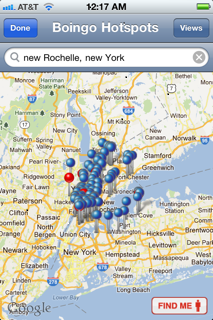
The Blue pins on the map show free hotspots; Red pins indicate Boingo hotspots.

To check where the hotspots are at the site you are traveling to, do the following on your mobile device:

1) Click the Boingo App Logo  2) Click Find Hotspots Near Me  3)  Type the  address, or city and state of the place you’re traveling to  4) When the Blue & Red pins show up, click the View button  5) click the List button  6) click Done, a list of locations will appear on your mobile device screen (see samples below). You can also click on a place to see more details (e.g., whether the hotspot is free).  Note:  Click the images below with your mouse to see a clearer picture.


Check out these great websites below by clicking the links for additional information:

  Boingo Wi-Finder for iPhone Review: Finding Hotspots Everywhere via Boingo Wi-Finder for iPhone Review: Finding Hotspots Everywhere

 ♦ Musings by Annelie Näs  Digital, and more digital – ideas, thoughts and reflections via Boingo Wireless Follow-Up: Special treatment for Blogging customers?.

I hope this is helpful 🙂 !


Twitter for Android Phone Users

As I searched for the best Mobile Twitter App for Android, what I discovered is the best app to use is the one endorsed by Twitter itself.  This app is free of charge, and can be found at the Android Market. Just click the link below.

  Twitter – Android Market


After you install the Twitter app, I suggest that you use the guidelines I found written by Dan Gookin, which explain how the program works for the Android phone.  These guidelines will be least confusing, and give illustrations, which explain the various parts of the screens (please don’t take the name of the article personally).  I have found articles by Dan Gookin, and by other authors in the ‘Dummies” book series, very helpful. Click the line after the word via.

How to Use Twitter on Your Droid X

By Dan Gookin

You can use Twitter through your Droid X to share your existence with others or simply to follow what others are up to or thinking. You can create a Twitter account by using your Droid, but it’s a lot more work that just using a computer. After you create a Twitter account, use the Twitter app on your phone to view Twitter updates or to tweet.

A good Twitter app was developed by the Twitter people themselves. The Twitter app is free and available at the Android Market.

The Twitter application provides an excellent interface to many Twitter tasks. The two most basic tasks, however, are reading and writing tweets.

via How to Use Twitter on Your Droid X – For Dummies.

*******************************************************************

For those of you who want to do a bit more research, check out the article below by TechShout, posted August 2011.

8 Best Twitter apps for Android phones to download – TechShout.

*******************************************************************

This post completes the sessions for using Twitter on your cell phones.  I hope this is helpful 🙂

How to use Twitter from your BlackBerry – Simple Help

How do I find a Twitter mobile app?

As I mentioned in last week’s post, Twitter mobile apps are probably among the more widely used for sending Tweets, and for keeping up-to-date with what’s happening on Twitter.  This week we cover how to use one of the most popular Twitter mobile apps recommended by Simple Help, a blog I often go to for information about various Social Media guidelines.  Simple Help provides easy to follow  illustrations, which I expect you will find useful in loading a Twitter app on your Blackberry phone.    Be aware:  these guidelines assume that you understand how find the web browser on your Blackberry device.  If you are not familiar with these techniques, now would be a good time to check out the manual for your phone.  You can find  Blackberry manuals at this link –  BlackBerry Smartphones – Manuals and Guides.

Twitter for Blackberry Users

Loading Twitterberry

This tutorial will guide you through every step of installing and using TwitterBerry, arguably the most popular Twitter client for BlackBerry devices.

1. First up, launch whatever web browser you use on your BlackBerry. Head over to http://orangatame.com/ota/twitterberry (or http://bit.ly/jE4rM – which is just a shortened version of the same link). After scrolling through the text, select the Download Now button. Then when prompted, click the Download button on your BlackBerry screen.

via How to use Twitter from your BlackBerry – Simple Help

I hope this is  helpful

Twitter via Smartphones: An Introduction

How do you network socialize?

In this week’s post we are focusing on Twitter Mobile Apps. As we discussed in a earlier post, mobile apps allow you to use the Internet and social media environments.


Here is a description I found, written by Amy Gahran, which explains mobile apps.  Please click on the link to her website for a more detailed description.

What are mobile apps?

A mobile app is software that runs on a handheld device (phone, tablet, e-reader, iPod, etc.) than can connect to wifi or wireless carrier networks, and has an operating system that supports standalone software.  via What’s a mobile app? – contentious.com.

Please note:

In upcoming weeks I will continue to provide  you with links to sources that  I rely on to bring you technology information.
In computing, a hyperlink (or link) is a reference to a document that the reader can directly follow, or that is followed automatically.
via Hyperlink – Wikipedia, the free encyclopedia.

How to use Twitter on your smartphones will have links to  Twitter Help, and  Simple Help. These are sources that I use for information frequently. However,  due to the popularity of the Simple Help site, there may be numerous advertisements on the page.  Nevertheless, the illustrations will be very easy to follow.

Also, don’t be discouraged with the new techniques required to view the information. These built-in transitions  will give you some ‘hands-on” training in navigating back and forth to more than one blog.. That’s part of what it’s all about, right?

Remember: tech4boomers is focused on helping you acquire, and familiarize yourself, with  the skill sets necessary to operate in a social media environment.. Enjoy the transitions…. Here we go…

Twitter for iPhone: An Introduction

Users who are getting started with Twitter for iPhone often have concerns about the following:

1. Where do I find the Twitter for iPhone application?

2. Will Twitter for iPhone work with my iPhone OS?

3. What’s new in the current version of Twitter for iPhone?

4. I need help with Twitter for iPhone!

5. I’m having trouble with an older version of Twitter for iPhone.

6. I want to know more!

Where do I find the Twitter for iPhone Application?

From your iPhone, click the App Store icon, type ‘Twitter’ into the search, and select Twitter for iPhone from the results.

Ok folks take the next step. Click the link below for detailed illustrations and guidelines.  🙂

via Twitter Help Center | Twitter for iPhone: An Introduction.

***************************************************************

In coming weeks we will focus on how to use Twitter on the Blackberry, and Android Smartphones.

See you next week 🙂 !

Wi Fi, 3G, 4G, Data Plans ? So many decisions! What’s a person to think?

It’s all so complicated! 

How does one make decisions about using cell phones; what service should you sign up for? Why do you need a data plan anyway?

AT&T pointed out recently, 200MB of data gives you the capability to send and receive 1000 e-mail messages no attachments and 150 e-mails with attachments, view 400 Web pages, post 50 photos on social media sites, and watch 20 minutes of streaming video.

via AT&T’s New iPhone Data Plans: Pros and Cons | PCWorld.

I cyber-searched’ for answers to these questions. Hopefully, my excerpts will assist you in understanding what you require and how to make decisions about your cell phones and data plans. Also, there will be links to the websites where I found information so that you can research more thoroughly, should you want to do so.

                                               ***********

What is WiFi?  Wi Fi is short for Wireless Fidelity and..?     🙂
According to Dictionary.com, wifi:wireless local area network: a local area network that uses high frequency radio signals to transmit and receive data over distances of a few hundred feet.

What is 3G? 3G is an umbrella term for a collection of technologies that make up the third generation of cellular data networks. These standards allow cell phones (and other devices capable of connecting to a cellular network) to send and receive data at speeds comparable to cable or DSL. via In A Nutshell: What Is 3G?.

What is 4G? 4G, an acronym for fourth-generation wireless, is a technology that will transform wireless communications in a completely new way. It is also known as “beyond 3G,” since it provides a comprehensive and secure IP (Internet Protocol) solution. Users will enjoy high quality streaming video and “anytime, anywhere” voice and data at a much higher speed than previous generations. via What is 4G?.

Other things you should know:

Notes:

* While some Internet Service Providers offer both 3G and WiFi internet, they usually consider them separate services and require separate subscriptions.

* 3G is almost always more expensive than WiFi connected to a fixed service, so when WiFi is available – use it!

* Most 3G Service Providers offer a USB modem with their subscription services at a cost.

* 3G can be quite fast, but is in most cases worse than WiFi.

* Other wireless technologies also exist.

via Cryptech V2 » Blog Archive » The Difference Between 3G Mobile Internet and WiFi Wireless Networks.

  Do you need a data plan?

The first thing you have to do is to guesstimate how much data you think you’ll use. Two gigabytes of data per month seems to be the magic cut-off for most carriers. The vast majority of customers–98 percent, according to AT&T–use less than this each month. Average smartphone subscribers are using roughly, 400 MB of data per month, according to Validas, which recently analyzed a year of consumer phone bills from all four major carriers.

A couple of carriers, AT&T and T-Mobile, offer 200MB plans for low-data consumption. The lowest tier of service that Verizon Wireless offers is 2GB. And Sprint only offers an unlimited data plan for its smartphone customers.

But as you can see these plans aren’t tailored precisely for average usage. So most smartphone subscribers will need more than the 200MB plan but less than 2GB.

via Ask Maggie: Help! These data plans are too confusing | Signal Strength – CNET News.

All the major carriers offer tools on their Websites to help you estimate your usage. So I suggest checking that out to get a sense of what you think your usage will be. Here’s a little guide put together by Verizon Wireless that should give you an idea of how much data certain activities eat up:

* Email (text only) = 10KB

* Typical Web Page Lookup* = 1.5MB

* Audio Streaming = 40MB/hr

* Lo-Res Video Streaming = 200MB/hr

* Hi-Res Video Streaming = 400MB/hr

* Digital Photo download/upload (Hi-Res) = 1MB

$$$$$$  What will it Cost?

 The next thing to consider is price. T-Mobile’s 200MB tier is $10 a month. The good thing about its service is that if you go over your limit, it only slows your service. This means you aren’t socked with additional overage fees. AT&T’s 200MB service is $15 a month. But if you exceed this limit, your service isn’t slowed or “throttled.” Instead, you’re charged more money for more usage.

via Ask Maggie: Help! These data plans are too confusing | Signal Strength – CNET News.

🙂   That’s all for now folks.   I hope this is helpful!