Unknown's avatar

About autocreate740

I am a senior citizen retired after working for 50 years in various professions. I find social media intriguing, blogging uplifting, and technology in general a welcomed challenge. My newest interests are Aromatherapy and Essential Oils. I have recently acquired an Aromatherapist Certification from the New York Institute of Aromatics. I write about all of these interests as topics on my various blogs. I am hopeful that the posts I create bring information that is useful and moves my readers to explore more.

The Twitter Zone

Just as we discussed previously in Tech4Boomer’s Post, “Digital Olympics”, nowadays
it’s as though there is a Technology Olympics going on.  What I mean is that the  “rate of change” is astounding.  As a matter of fact, you should receive a  Gold Medal if you can keep up with what’s happening with Social Media.  Just when you think that you have achieved a happy, and somewhat dynamic  equilibrium,  grasping the changes  occurring within the social media phenomenon, e.g., Apps, Foursquare, Google Earth, chatting with friends, and followers (are they bots?) etc., you come to find out that actually it has changed again, and you have just entered another dimension:

The Twitter Zone”.

I had a fortunate reading experience with an article written by Andy O’Donnell at About.com Guide. The article, which is about Twitter, not only introduced me to terminology I had never encountered, it also brought to my attention the importance of periodically checking who is following you on Twitter.

These are some of the topics that O’Donnell  covers in the article:
  1. How to use Status People’s Fake Follower check to see what percentage of your followers are fake, real, or inactive.
  2. How to report followers for SPAM and what happens when you do.
  3. Malicious Twitter bots, which are used to spread links to malware, and how they are often disguised as shortened links.
  4. The importance of checking whether some of your followers are legitimate. Sometimes you can just check if they have any followers.
  5. How to protect your Tweets by putting restrictions in place. Of course in this case you will also have to ‘approve’ each ‘follow’ request. In addition, your tweets will only be seen to those you have approved.
  6. How to Block other Twitter followers.

Use these links to check out the guidelines and get  some of the details of various things you should know about and take action on:

Glossary:
Twitter BotsIn addition to spammers, hackers and internet criminals may send out malicious Twitter bots5 to follow you. Malicious bots are used to spread links to malware which are often disguised as shortened links6 so that the malicious link itself is obscured from view by the shortened link. http://netsecurity.about.com/od/informationresources/a/How-To-Prevent-Strangers-From-Following-You-On-Twitter.htm?p=1

SPAM and SPIM bots
These bots bombard your inbox with SPAM and interrupt your chats by sending you unsolicited instant messages (SPIM). http://netsecurity.about.com/od/advancedsecurity/a/Malicious-Bots.htm

PUBLIC & PROTECTED TWEETS https://support.twitter.com/articles/14016-about-public-and-protected-tweets#

Are all bots bad?  So, now we know how to recognize them. But there is another issue. Is it bad to follow a bot? It might be, if it’s a bot that tricks you into buying things you didn’t want in the first place, or if you think you are really dealing with a person. But maybe not always. via How to recognize Twitter bots: 7 signals to look out for.

Help

Read the entire Andy O’Donnell article using this link:
http://netsecurity.about.com/od/informationresources/a/How-To-Prevent-Strangers-From-Following-You-On-Twitter.htm?p=1

What Are Strong Passwords?

 As we consider time, and time again  how to protect our on-line privacy, one of the more important aspects of using the Internet’s, Email, Banking, Shopping, Twitter, LinkedIn, FaceBook websites is our Passwords. These are the keys to accessing our ‘private’ information. But, what is  a strong password? How do we cope with the fundamental need to create complex ‘passkeys’ ? How do we avoid  having ‘unauthorized’ sources acquire this information?  I searched the Internet. Below is a summary of  what some experts think:

  1.  create complicated passwords.
  2.  passwords should be longer than six characters.
  3.  passwords should be changed frequently.

Additional Suggestions

  • Updates: The longer you keep the same password, the easier it is for someone to get access to your private data.
  •  Change your passwords every six months (recommended by  The Information Technology Department at Utah State University)
  • Complexity: According to Microsoft.com, passwords should be at least eight characters in length, preferably 14 characters or longer. The more complex the password, the less likely it is to be stolen. Read more about this by checking this link – via How Often Should You Change Your Password? | eHow.com.

For those of you who find it difficult to create complicated passwords, there are websites that you can use to help you with this task.  Use the links below which may help you get this done is an easier fashion.

 iphone –

How should you keep track of your passwords?

A more secure way to keep track of your secret code is to download one of the many password managers available online. Two of the most popular are RoboForm and LastPass. These are plug-ins that collect your passwords as you make your way around the Web, encrypt them and store them either on your computer or on the company’s servers, or sometimes both.

If you come up with a complicated password that you are likely to forget immediately, no problem. The password manager will remember it and automatically fill it in when a pass code is requested the next time you’re on the site. Many of the password managers even generate obscure passwords for you.

Security experts said a password manager is a good way to secure your codes from most hackers, but there are downsides you need to consider. There is still the risk that sophisticated hackers can come after your password manager and get all the stored pass codes in one swoop. via Three easy ways to keep track of your passwords – latimes.com.

 Most of us are keeping our passwords on post-its, little slips of paper, and in our head, and often we even forget what the last password we created was because we are moving so quickly trying to get the task done.

 If you are the pen and paper type, you can keep a notebook handy and write down all the websites you visit as well as the user names and passwords. Do not forget to update the notebook when you visit a new site. via How to Keep Track of Passwords | eHow.com.

I hope this is helpful 🙂

Dealing with Online Public Privacy

How many of us have given up on the online privacy issue? Just when you think you have it under control by using the tools your browser has made available to you, “they pull you right back in!” Some of you may already know that even if you use the preference signal requesting not to  be tracked via your browser choices, web sites can choose not to honor your request.

Recently an article by Natasha Singer of the New York Times discussed the various issues about the privacy of consumers using online services, and what is being done to address this concern.  In her article she advises that Microsoft’s latest version of its Internet Explorer browser coming out in October 2012, which is included with Windows 8, will have a “do not track” option. Below is a summary of that article.  Additionally, you can click the link to the article at the end of this summary to read all the details.

Some topics discussed in the article are:
  What is different about Microsoft’s new “do not track” option?   Answer: The new Internet Explorer 10 comes with the “don’t-track-me” option automatically enabled. Users will have to switch the option off on a customization menu to be tracked. Therefore, with this browser non-tracking is the norm.

This is a radical move for a technology company like Microsoft, which has an ad business of its own.  Here’s why: The prospect of people opting out of tracking presents a risk for marketers. Consumer data fuels the power of the Internet. Ads support “free” content like email services, search engines, as well as social networks.

 If millions of consumers “opt out” of behavior-based advertising many ad-sponsored sites could shut down or put up pay walls for people who choose not to see the ads.

Consumers generally do not change pre-set technology options, which heightens the concern of marketers that this browser could shift millions of people to the do-not-track category.

 The World Wide Web Consortium (W3C) an international standards body has created a working group to standardize the technology for do-not-track systems. However,  marketers and privacy advocates are still at odds over the definition of “do not track”.

 In the meanwhile, Twitter users will be interested to know that Twitter has already agreed to honor Mozilla’s do-not-track signal.

What’s certainly true is this discussion will continue to evolve, and as consumers of the Internet, it is a topic that we should continue to watch so that we know how information is being gathered about us.

To read more about this topic click the link below:

http://www.nytimes.com/2012/09/16/technology/in-microsofts-new-browser-the-privacy-light-is-already-on.html?pagewanted=all&_moc.semityn.www

I hope this is helpful 🙂

How to Manage your Digital Identity

“You have zero privacy anyway. Get over it”.
Scott G. McNealy CEO of Sun Microsystems Inc. January 26, 1999

Browsers & your Digital Footprint – I don’t think tech4boomers can cover the privacy on-line topic too often. In fact, in March 2012 we published a post “The Scoop About On-line Snooping”) where we covered this topic.

Every time we  revisit this topic, there are new techniques and products, which claim that they can “fix” this very perplexing issue of how to protect our identities and the information being gathered by browsers (e.g. Google) on the World Wide Web (www).

Nowadays, every time we use the Internet our “habits” (e.g. places we like to visit, and spend money and time) are being recorded by “cookies”.

Cookies are messages that web servers pass to your webbrowser when you visit Internet sites. Your browser stores each message in a small file, called cookie.txt. When you request another page from the server, your browser sends the cookie back to the server. These files typically contain information about your visit to the web page, as well as any information you’ve volunteered, such as your name and interests. via What are cookies? – Knowledge Base.

Our dependency on the www makes it very difficult to avoid information being gathered about our on-line habits.  For example, every time we email, pay bills, order on-line, or use skype, information is being gathered about us. Google has in fact confirmed that it gathers information when you use its browser.  Opposite to what you might expect, Google has also produced a set of guidelines on how to protect yourself from its on-line “snooping“.

What Can You Do About It?

Recently I came across an article “How to Erase Your Digital Footprint”, by Jeffrey A. Lambert – Maximum PC. A summary of that article states the following:

visiting web sites produces “tracking cookies” on your computer.  Cookies allow these websites to keep track of your online preferences.

 the Network Advertising Initiative (NAI) is working towards providing solutions and making consumers aware of the practices.

 there are tools available that can be added to your computer for constant monitoring and control to help you find out how big your digital footprint is.

Digital Footprint Calculator will estimate your digital footprint.  This is a service from EMC Corporation.

on a daily basis Google “pings” your browser for information about browsing history. This helps them to target advertising.

  “free” software is available which helps to determine how often Google is “pinging” your computer browser. e.g. Google Alarm by F.A.T. Labs  will give you a visual or audio alert when personal information is sent to google servers.

Simply cleaning out your cache of cookies on your computer will aid you in safe browsing. Check your preferences option in your browser and click the “delete cookies” option.  However, be aware customization on sites you visit will also be deleted.

There is much more to learn about various techniques that can help you reduce this concern.  Check out the full details by clicking the link below.

Erasing Your Digital Footprint -via Maximum PC | How To Erase Your Digital Footprint.

I hope this is helpful! 🙂

Keeping up with tech news…

iPhone/iPad

 ♦ Periodically tech4boomers highlights articles that have tips, tricks and useful information.  This week we want to call your attention to an article by Katherine Boehret, of the Wall Street Journal, which covers iPhone and iPad things you should get to know. Don’t forget to click the link provided for the details.  A sample of what she covers is: how to directly access apps, how to Tap to scroll up, keyboard shortcuts, how to take screenshots, how to swipe search.  In all she covers ten things you will want to know.  Click this link for the article: via Ten Tips and Tricks Every iPhone and iPad User Should Know – WSJ.com.

———————————

Choosing Computer Monitors

The next article we think you will want to read is by Kate Murphy at the New York Times, Personal Tech section.  This article covers what you should consider when buying a computer monitor.  Since we spend sooo much time these days looking at computer screens, it’s important to know why you choose one monitor versus another, and how important  the specs are. Ms. Murphy explains resolution, and how the picture elements (pixels) are supposed to give a sharper picture quality.  However, that may be true only up to a point.  Murphy checks with a retinal neuroscientist for his opinion.  In addition, contrast ratio is explained. But, after all of this discussion it turns out “Response time is the first thing to look at”. Ergonomics play an important role when choosing a monitor. How monitor ergonomics affects eye, back, and neck strain is also reviewed. All said, this is an important article.  Read more by clicking this link: via Things to Consider When Buying a Monitor – NYTimes.com.

I hope this is helpful 🙂

Find it …Keep it?

How many of us have experienced the loss of an unreturned phone?  Recently,  I was wondering what goes through any person’s mind who finds a phone belonging to someone else, and decides to keep it, or sell it.  What are their thoughts about keeping something that is clearly an important personal item of someone else?  Is it that they relate to the ancient Roman law, Finders, Keepers?

Finders, keepers is the adage with the premise that when something is unowned or abandoned, whoever finds it can claim it. This idiom relates to an ancient Roman law of similar meaning and has been expressed in various ways over the centuries..via Finders, keepers – Wikipedia, the free encyclopedia.

Have you ever had the opportunity to return something of value to someone else?  What makes a person do his/her best to return an item to the owner? Is it moral conviction/training value within a person?

Honesty refers to a facet of moral character and denotes positive, virtuous attributes such as integrity, truthfulness, and straightforwardness along with the absence of lying, cheating, or theft. “Honesty is the best policy.” — William Shakespeare, Mark Twain, Steve Landesberg and Tony Farrugia. all said this saying.via Honesty – Wikipedia, the free encyclopedia

The next time you find yourself in this situation, below are some guidelines and links to websites for details on what you can do if you believe that “honesty is the best policy”

If you find a locked iPhone

Since you can’t unlock the phone, you can’t poke around… But you do have options.

  • The first is to hold down the Home button for a few seconds, which may—depending on the owner’s phone settings—trigger either Siri or Voice Control. In either case, when prompted by the beep, say, “Call ICE.” If the phone’s owner has an ICE contact as described above, the phone will either start calling that person right away or ask you to clarify which number to call (as in, Home, Mobile, Work, etc). If you luck out and connect with the emergency contact, you can explain the situation to that person.via What to do if you find a lost iPhone | Macworld.

Call the police

  • You can also turn to your local police department. Manalapan, N.J., police officer Joe Felicia told Macworld that after you turn a found phone into the police, “if the owner responds to the police station and can identify the phone, the police department will return the phone to the owner. If not, the phone will go in a bin with hundreds of other phones.”

Felicia said that he sees “no problems” with trying to search the phone to locate the owner, if “it is being done in good faith.” The one catch: “If you are searching the phone and you stumble onto something that is obviously illegal… the phone would go directly to the police.”via What to do if you find a lost iPhone | Macworld.

Find the owner of a lost cell phone

  • Power the phone off. This can be done by holding down the power button on the phone. The power button is usually on the right side of the phone, toward the bottom. On some phones the power button is highlighted in red..
  • Turn the phone back on by pressing the power button again. You may need to hold the button for a second for it to power back on..
  • Watch the screen to discover the service provider. Once you know the service provider, contact the company’s customer support phone number. Many phone companies’ websites have “Contact Us” sections where you can find this number…
  • Answer questions from the representative the best you can. The agent may ask for the phone’s serial number and the type and style of the phone. If you are not sure of these answers, the support agent can help you locate information. The information you provide should be able to give the agent the information he needs to find the owner.
  • You may be asked to bring the phone to a local store or mail the phone back with a prepaid envelope the company sends you. via How to Locate Cell Phone Owners | eHow.com.

I hope this is helpful 🙂

Green Wi Fi in New York

Who doesn’t remember the mild-mannered avatar Clark Kent using the iconic telephone booths to change into Superman, and then flying off to ‘protect’ Metropolis !  Those were the good old days!

Well let’s Flash Forward to our Metropolis, New York City, where the telephone booth will now be used to enhance the lives of its citizens by providing Free Wi-Fi… Read on…

Let’s review what Wi-Fi is againWi-Fi internet is a way of accessing the internet using a wireless network through an wireless access point. This replaces the traditional use of using a networking cable to access the internet. Read More »via Ask.com – What’s Your Question?.

 New Yorkers and visitors are now able to connect free-of-charge using their smartphones, tablets, and other WiFi-enabled devices. Access is currently available at 10 locations, with additional hotspots to follow in the coming months.  via NYC Digital – News.

The wireless signal of the pay phone booths will span an 100 to 200 foot radius and the network will appear as “Free WiFi” or “NYC Free Public WiFi” on phones, laptops, tablets, and other WiFi devices.

 The network isn’t password protected, but when you launch your browser, you will be required to agree to terms and conditions before surfing the web. Read More via New York City Pay Phone Booths Now Free WiFi Hotspots – ABC News.

LOCATIONS:  Manhattan 402 West Broadway (at Spring Street); 458 Seventh Avenue (at 35th Street); 410 Madison Avenue (at 48th Street); 1609 Broadway (at 49th Street); 1790 Broadway (at 58th Street); 230 West 95th Street (at Broadway).Brooklyn 545 Albee Square; 2 Smith Street (both at the Fulton Street Mall).Queens 30-94 Steinway Street (at 31st Avenue). Read More via City Begins Wi-Fi Pilot Program in 10 Phone Booths – NYTimes.com.

Click for Maps:  via City of New York – NYC Public WiFi Hotspots – foursquare.

HOW TO USE PHONE BOOTH Wi-Fi

Look for a phone booth that says WiFi or Free WiFi labelled on it.

Stand within 200 feet of the WiFi-enabled phone booth.

On your phone or laptop, connect to either of the wireless networks, “Free WiFi” or “NYC Free Public WiFi.”

Upon launching your browser, agree to the terms and conditions.

Go on the Internet, email, stream, or do anything else Internet-related.

For more details click link: via NYC phone booths will be free WiFi Hotspots – How to connect to NYC WiFi phone booth? — New York Computer Help Blog.

I hope this is helpful 🙂

O/S–What Operating System?

How many of us are holding on to that computer we bought many years ago, hoping that it will serve our purposes in the future?  How many of us know what Operating System we are using, and, if we need an upgrade?

The Operating System is the most important program that runs on a computer.
Every general-purpose computer must have an operating system to run other programs.
 Operating systems perform basic tasks, such as recognizing input from the keyboard, sending output to the display screen, keeping track of files and directories on the disk, and controlling peripheral devices such as disk drives and printers. via Operating System – A Definition From the Webopedia Computer Dictionary.

¿ What Operating System Are You UsingWindows XP originally released in October of 2001. Almost 11 years ago.

  1. Today you may want to check which O/S you have on your computer.
  2.  Go to your Control Panel.
  3.  Click Help.
  4. Click About Windows.  A screen will pop up with the ‘version’ of your operating system.

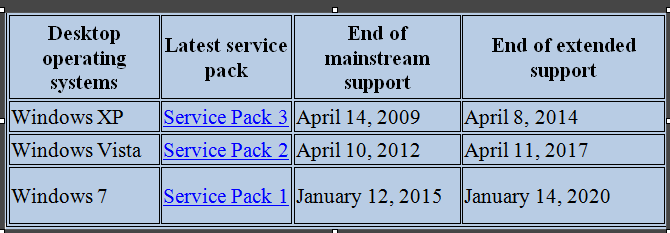
¿Is your Operating System Windows XP? If the answer is Yes, then you may want to consider an Upgrade because in the near future the XP Operating System will no longer be supported, and this will put  the information stored on your computer with an outdated XP O/S at risk.  Look at the chart below, and check  today if you need to upgrade.

Click the diagram to see a larger image

XP Operating System Users:
Below is an explanation of the things you should know. Click on the link for the fact sheet if you want a more detailed explanation.

SUPPORT

Extended support—(Commercial Customers Only) Microsoft will offer extended support for either a minimum of 5 years from the date of a product’s general availability, or for 2 years after the second successor product (two versions later) is released, whichever is longer.

End of Mainstream support …if you buy a new version of Windows and five years later another version is released, you will still have two years of support left for the previous version.

End of support refers to the date when Microsoft no longer provides automatic fixes, updates, or online technical assistance. This is the time to make sure you have the latest available service pack installed.

Without Microsoft support, you will no longer receive security updates that can help protect your PC from harmful viruses, spyware, and other malicious software that can steal your personal information. via Windows lifecycle fact sheet – Microsoft Windows.

Don’t delay, check your Operating System today!
In the next post we will talk about upgrading your Personal Computer.

I hope this is helpful 🙂

July 9, 2012 … DNS Changer Deadline…

 Have you tested your computer at the FBI Website to make sure you are not infected with DNS Changer Malware? In our June 18, 2012 post we discussed  what it’s all about.  Below is a summary of an article written by Matt Peckham at Time Techland. It’s a reference about the FBI deadline and what will happen if you do not check your computer(s) for DNS Changer Malware… Click the link at the end of the summary to read the entire article.

 ♣ There’s a story circulating that if you don’t ensure your computer is malware-free by July 9, 2012, the FBI will shut off your access to the Internet. Like most such alarmist claims, it’s only partly true, though if you’re a Windows or Mac user, you’ll want to pay attention…

 DNSChanger targets Windows or Mac systems (Linux, iOS and Android users are in the clear) by manipulating Domain Name Servers (DNS), which translate syntax-based URLs into IP addresses…

To be clear, your Internet service itself will be unaffected by the change: If your computer is infected with the DNSChanger malware, your Internet router will keep routing and any commands sent by your computer that aren’t DNS-related will still pass.

 The FBI isn’t shutting off Internet service to impacted machines, it’s just pulling the plug on a stopgap measure designed to bandaid the broken process currently facilitating DNS communication on infected machines…

How do you tell if you’re infected? Simple: The FBI runs a DNS checker page, where you can type your DNS info into a box to check its validity. Easier still, you can click on a link that’ll automatically check and return either a green or red background, indicating “clean” or “infected” states, respectively. via DNSChanger: FBI Warns Infected Computers Will Lose Web, Email Access in July | Techland | TIME.com.

You can check your computer now by clicking the dns-ok  link below.

http://www.dns-ok.us/

♣ ♣ ♣

I hope this is helpful ! 🙂

Digital Olympics …

Just when you think you have seen the best and  latest computer Apps, Laptops, Games, etcetera, you learn there is something better! How are we supposed to keep up?  How do we know if we are purchasing the latest, greatest computer thing? The answer is . .  . You probably do not know:)! Today’s computer technology creative surge appears to be endlessly … NEW ...!

This week’s post will feature a few of the most interesting things we’ve recently read about. For starters, it turns out (as we all may have guessed), Apple still has “sparkling” surprises for Apple “Groupies”.

The New Mac Book  is reported to be Super!  Fast, thin, light weight, long battery life, great memory.  The list is very long.  You may want to check out the article to get the full details.  Click on this link  DAVID POGUE’s review published June 12, 2012. via Apple’s MacBook Pro Is Just One Point Short of Perfection – State of the Art – NYTimes.com.

When you are not sure what Apple product you should buy, you may want to check out the Buyer’s Guide for Apple models. Although they do not guarantee that the rumors are totally aaccurate, it’s a good place to start doing your research before you buy an Apple product.  And we all know, rumors often are very accurate  :).  Click the link to get there. via Mac Buyer’s Guide: Know When to Buy Your Mac, iPod or iPhone.

Health APPS –We all can use support when we learn that we may have to undergo a serious medical surgery procedure. drawMD looks like it may be useful for just this type of situation.   There are various types of drawMD APPs which discuss specific procedures (e.g. anethesia, critical care).   Check out what they have to say about their product, and the APPS are Free!

Are you a patient scheduled to undergo a procedure? Bring your iPad with drawMD to your appointment and get visual answers to your questions. Clear images of procedures will help you break down the medical-speak and get a deeper understanding of your treatment options. via drawMD Sampler for iPad on the iTunes App Store.

Have you Android users been feeling a little jealous of your iPhone4S friends and their ‘personal assistant’ ?  Well you might be interested to know that there are APPS for Android that do some of the same things, and you can find and use them for  Free!  Check out the 5 Best Siri Alternatives … link below and see for yourself.

iPhone 4S … the thing that received most of the attention was the new personal voice assistant called Siri. It is an awesome feature that has the ability of converting your speech into action and you can use it to perform most of the tasks on your iPhone 4S. But what to do if you are using an Android phone and want to get the Siri like personal voice assistant? via 5 Best Siri Alternatives for Android.

 FBI DEADLINE FOR DNS CHANGER IS JULY 9, 2012

Here's the link→    https://forms.fbi.gov/check-to-see-if-your-computer-is-using-rogue-DNS

I hope this is helpful 🙂