Unknown's avatar

About autocreate740

I am a senior citizen retired after working for 50 years in various professions. I find social media intriguing, blogging uplifting, and technology in general a welcomed challenge. My newest interests are Aromatherapy and Essential Oils. I have recently acquired an Aromatherapist Certification from the New York Institute of Aromatics. I write about all of these interests as topics on my various blogs. I am hopeful that the posts I create bring information that is useful and moves my readers to explore more.

iOS 7: AirDrop video walkthrough

Fyi_33

If you’re interested in how the new AirDrop feature works with Apple’s new operating system, check out this video I found on YouTube.  Just click the link below. In addition, check out the ultimate Safari guide , which has very useful Tips!

iOS 7: AirDrop video walkthrough via iOS 7: AirDrop video walkthrough.

I hope this is helpful! 🙂

AVG AntiVirus FREE 2014 Review & Rating | PCMag.com

fyi only signIf you are not sure what to do about purchasing Anti-virus software below is a great article I found at PC Magazine.  Make sure to read it and get protection at your first opportunity.  After all, it’s FREE!

♦♦♦

By Neil J. Rubenking.

If you dont have antivirus protection installed on all your PCs, shame on you! Given the quality of free antivirus products currently available, theres just no excuse for going without protection. AVG AntiVirus FREE 2014 is a good choice. I had a little trouble getting it installed on malware-infested test systems, but once installed it did a good cleanup job, and it turned in a great score in my malware-blocking test.

via AVG AntiVirus FREE 2014 Review & Rating | PCMag.com.

Define Ergonomics – What is Ergonomics?

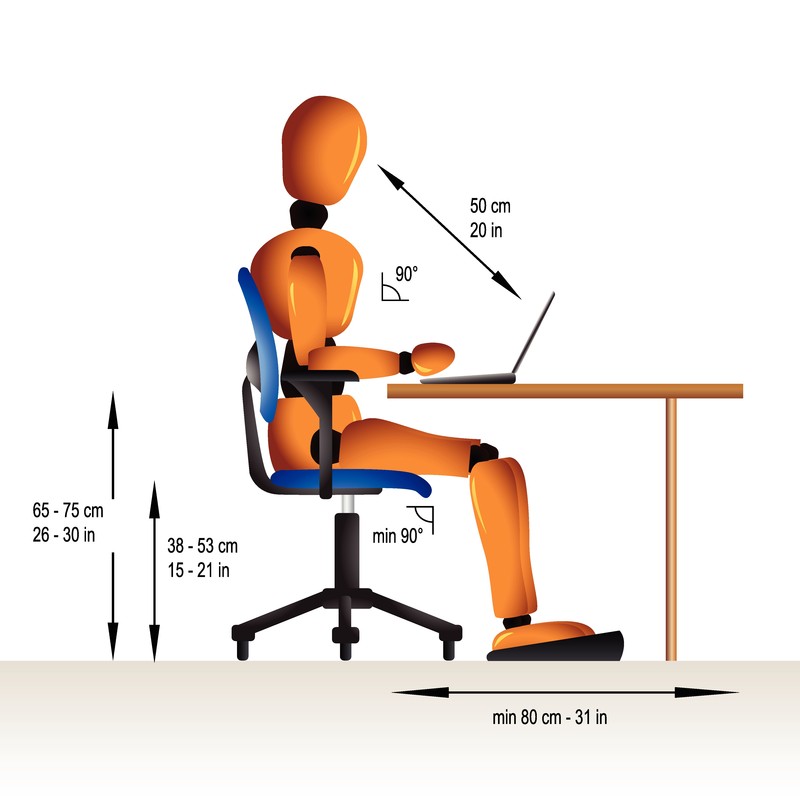
Why is ergonomics important?  Ergonomic chair

You may ask, “Why is Ergonomics Important?” Afterall, some ergonomic computer furniture honestly looks gimmicky.

However, the study of ergonomics is heavily engineered for ergonomics health safety. Proper ergonomic design is necessary to prevent repetitive strain injuries, which can develop over time and can lead to long-term disability.

With people living and working longer, we have to combat the foreseeable problems of an aging workforce. However, common injuries caused by poor ergonomic working conditions are not limited to the aging workforce. These injuries include, back pain, carpal tunnel, posture disorders, repetitive strain injury, tendinitis, eye strain, wrist pain etc. via Define Ergonomics – What is Ergonomics?.

Back To School Technology Tips…

canstockphoto15263592Could it be that the time is actually upon us to think about purchasing ‘Back to School’ items for our Echo-Boomers (children or grandchildren  of Baby Boomers)?  However, it may seem (or not), once again the time has arrived for us to make decisions about Laptops, Apps, Cell Phones, and other mobile devices for the new school year.
With that in mind, I looked around for some of the best HELP I could find on the Web, which I think will help you in making informed decisions.  Make sure to click the links at the end of each suggestion for more details.
♦♦♦
  1. Find age-appropriate movies, books, apps, TV shows, video games, websites, and music that you and your kids will love. Browse our library of more than 18,500 reviews by age, via Parent reviews, Family reviews | Common Sense Media.
  2. Make sure to read the Common Sense Media Blog. Click the link:  Making Sense – Common Sense Media Blog | Common Sense Media.
Below is a list of discount programs. Make sure to click the link for more details.
  1. Amazon StudentFor college students.  Amazon offers students a free six-month trial of Amazon Student to those with a valid .edu e-mail address (or you can provide proof of your student status). It includes free two-day shipping, deals and promotions exclusively for students, and a $10 credit when you refer a friend. After six months, you get a discount on Amazon Prime ($39 instead of $79 a year), which adds unlimited video streaming and the ability to borrow books on a Kindle.
  2. Apple Store for Education. For college students and their parents. You can buy a Mac and get a $100 App Store Gift Card. If you buy an iPad or iPad mini for school, you’ll get a $50 App Store gift card. And currently Apple’s offering free shipping on any school supplies.
  3. BestBuy.com College Student Deals Find the best laptop or desktop for your needs and budget with our computer buying guide and Ratings. via Back to school: Discounts on computers and other electronics – Yahoo! Finance.
  4. For college students. Best Buy has discounts on computers and lots of other accessories; currently, you can get $100 off MacBooks and iMacs, and 10 percent off some touch-screen all-in-one computers plus free shipping, for example. Sign up with your .edu student e-mail address, and the store then sends coupon codes that you enter online at checkout.
  5. In 2013, every student — from the first-grader learning to read to the graduate student writing a thesis — needs a full-fledged Mac or PC laptop.Tablets can be helpful for taking notes in class or doing some quick research, but when you want to get that term paper done, you need the real keyboard, screen and operating system that only a laptop can provide. Here are 8 tips to help you find the right student laptop for any age and course of study. via 8 Laptop Buying Tips for Students | LAPTOP Magazine.
*** Other Resources Worth Checking Out ***canstockphoto0947076
  1. Smartphone Buyers’ Guide 2013: 7 Things You Need to Know via Smartphone Buyers Guide 2013: 7 Things You Need to Know.
  2.  Consumer Reports Guidelines are at the link below:
    http://www.consumerreports.org/cro/computers.htm?EXTKEY=AYAHRE02

I hope this is helpful 🙂

Privacy On-line.. Should We Surrender?

surrender privacyHow many of you are wondering if your attempts to control your privacy on-line is probably going to be one of the most challenging tasks before you?

In recent weeks there have been so many news articles headlining breaches in security safety for people as well as for government information!  Just when we think we have it under control they pull us right back in with stories that suggest there is no sure-fire way to secure our information.  How can we not feel vulnerable?

So are you planning to surrender?

eyespy

For those of you who believe you want to continue the challenge of protecting your digital identity, below are some guidelines that have been suggested from various professionals.  As always, click the link provided at the end of the summary for a more detailed description.

  1. Use Adblock Plus:  Adblock Plus (ABP) is an open-source content-filtering and ad blocking extension for Mozilla Firefox (including Firefox for mobile, Google Chrome and Opera web browsers. In November 2012, Adblock Plus was also released as an app for Android devices. ABP, a forked version of Adblock, allows users to prevent page elements, such as advertisements, from being downloaded and displayed. via Adblock Plus – Wikipedia, the free encyclopedia.
  2. Adblock is free:  Click this link to learn more: Adblock Plus – Surf the web without annoying ads!.
  3. Use Ghost E-Mail: Create various e-mail addresses. Companies often share your email address. Using the same email address across various sites may allow companies to connect those address with your identity. When using sign-up forms it may be wise to withhold some of your personal information.
  4. Use a “dumb phone:  Low tech phones can only make calls and send text messages. Smartphones are designed to track everything you are doing on the Internet. You can use this link to check what services are available for this type of equipment. http://www.engadget.com/2013/04/12/verizon-new-prepaid-basic-plan/
  5. Use Multiple Browsers:  Google Chrome, Apple Safari, Mozilla Firefox. Use one browser for email, one for social networking, and another one for general browsing.
  6. Pay Cash.  All credit cards leave digital trails and are used for tracking purposes.  Pay cash for items you want to keep private (such as, health items).  Pay cash for alcohol, cigarettes and other personal items.   via Ways to Make Your Online Tracks Harder to Follow – NYTimes.com.

Twitter Privacy

twitter_mannersTwitter users will want to read this post about Online Privacy Settings, by Susan Wright-Boucher in Communications, Social Media .  Click the link for details.  3 Steps to Better Online Privacy on Twitter | Susan Wright-Boucher.

I hope this is helpful!  🙂

LinkedIn Savvy Boomer…

baby boomer_savvy

How do we become LinkedIn Savvy Boomers?

One way is to understand how to manage the information we have in our profiles.  For example, suppose you need to change your email address, or add an email address to your profile.  How does one do that?  For those of you who do not know how to manage this information Tech4Boomers has created a step-by-step illustration on what to do.

They say a picture is worth a thousand words right?  Well in upcoming Posts,  Tech4boomers, will continue to provide pdf documents  you can view and even print out to help you with managing your software questions.  We look forward to hearing from you.  Let us know if this helps, and other questions you would like answered in a step-by-step format. Click the link below to find out how to change your email address in LinkedIn.

pdficon_large  Tech4boomers_Change LinkedIn Contact Info

I hope this is helpful 🙂

Tips for breaking those email chains….

echainsAren’t you feeling that just when you thought you had your email ‘under control’, you get pulled right back in? The onslaught of email on a daily basis, whether it be at the office or on home accounts is just ‘out of control’ for many of us. That’s why I believe we can never have too many suggestions for managing email.

A recent article by Jenna Wortham of the New York Times had suggestions that can be easily done by most of us.  Below is a summarized list of those remedies for email clutter.  As always, click the link at the end to read the full article.

  1. Go into the settings of your Facebook, Twitter, LinkedIn accounts and turn off the notification services.
  2. When you cannot ‘unsubscribe’ to emails you do not want from a particular source, setup filters that will direct them to a particular folder.  This will give you an opportunity to read those emails at your convenience before you delete them.
  3. Setup Rules, which Flag emails from sources that need VIP attention. This will help you to not miss your most important emails that need immediate action, or attention.
  4. Try communicating with Twitter, text or use the phone with your friends and family.  This will eliminate their need to send an email to you.
  5. Check your email often during the day to avoid getting a backlog.  Then, reply immediately.  Also archive frequently to avoid Inbox email clutter.

Email has become an integral – even essential – part of our communications capabilities.  As such, everyone, including our Spam communicators, is trying to reach us via email.  We have to find ways to manage/stem the daily influx.  Check out the article.  There are many more suggestions for handling email. How to Lighten the Crush of E-Mail – NYTimes.com.

I hope this is helpful 🙂

Manners for the Twitter Zone

twitter_mannersIn this latest of the recent series about on-line manners, below are some guidelines I found, which I think are great for Twitter users. As always click the link at the end of the summary for a more detailed description.

♦ ♦ ♦

♦ Twitter manners 101

  1. Be gracious.
  2. Be social. Twitter is about conversation, not monologue. Say “thank you” a lot.
  3. Use the @ reply to publicly thank someone.
  4. Don’t just follow people; engage them.
  5. Have a sense of humor.Refrain from flaming.
  6. Use your words to encourage and lift up rather than to tear down.
  7. Never underestimate the power of a tweet.
  8. Don’t follow someone expecting him to follow you back. Follow because you’re interested in what the person has to say. Conversely, and somewhat ironically, if someone does follow you, it’s courteous to follow back.
  9. Be informal. Have fun. Don’t treat it as a chore.
  10. Don’t hound influential people, begging them to read your blog or retweet you. Win their trust and influence by being remarkable and serving them first. My best strategy for networking is serving others. via 20 Essential Tips for Better Twitter Etiquette | Goins, Writer.

know_rules

It is always a good idea  to check out some of the rules Twitter has about:
Impersonation,Trademark. Privacy, Violence and Threats, Copyright, Unlawful Use, Misuse of Twitter Badges via Twitter Help Center | The Twitter Rules.

You should also check out: Rules and best practices via Twitter Help Center | Rules and best practices.

I hope this is helpful 🙂

Guidelines for Facebook Users

caution robot_facebookContinuing with our theme of  technology manners and proper digital behavior in general, I looked for some tips that could be useful for Facebook users.  Below are some of the highlights I found at  http://brainz.org/10-must-follow-facebook-etiquette-rules/.

Do yourself a favor and check out the full post at your next opportunity.  In the meanwhile keep these ideas in mind.

  1. Present a true/ FILTERED – representation of yourself. Remember strangers are included in this digital space.  Refrain from bashing your ex, bosses, or others who have irritated you in the past.  REMAIN NEUTRAL!.
  2. BE CAUTIOUS who you accept and send friend requests to.  If you share pictures, or other personal information be aware that those items could be shared with the entire world.
  3. Facebook was devised to bring out everyone’s inner narcissistic demons. Be sure to tame the beast with careful moderation.
  4.  Keep it a mystery. Everyone loves a mystery. Keep your posts short and sweet with concise, thoughtful words. Avoid rants and ramblings.
  5. Purge. If you’ve collected a large Facebook following in the form of friends from your past but would rather not have them in your present, purge them.
  6. If you’re going to be dishonest, don’t get caught on Facebook. There are no laws against lying but just because you can, does not mean you should. If you must lie, be careful not to get caught on Facebook.

purple starBelow is  another great site to use for Facebook Manners:

This blog is composed as a guide to life; how the simplest of pleasures can become so hideously complex once they are mixed into our various daily activities. Why not just log off? Why not indeed? Perhaps because that ‘friend’ from those old school days has just got back in touch (I wonder what s/he’s doing now?), your father knows more about your life than is healthy and insists on writing on your Wall, or you live in a small radius of a wealth of interesting neighbours and yet none are your friends on Facebook…

So whilst we are all hooked up, plugged in and tuned out to technology, some things do not change. So it is here that the everyday machinations of what to do, when to do it and how/not to appropriately stay in touch are drawn together. If you are not suitably attune to etiquette, then you are not operating at full capacity to be a more comfortable, pleasant and happy person. via About this site | Proper Facebook Etiquette.

I hope this is helpful 🙂