Intro to Twitter_Tech4Boomers_Session 2

Now that you have your Twitter ID, and are able to log in, you will want to become acquainted with how to send Tweets.  “Tweets” are the messages you type.  You can type a maximum of 140 characters.  Don’t worry,  Twitter counts the characters for you!  🙂

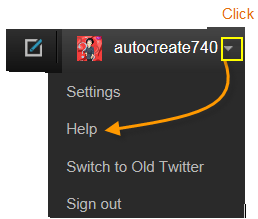
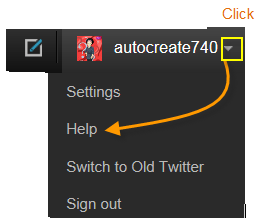
There are  Help/ guidelines available  in Twitter, which you can access with the down arrow next to your user name as shown in the illustration below.

Get help here

Use the Help button for detailed guidelines


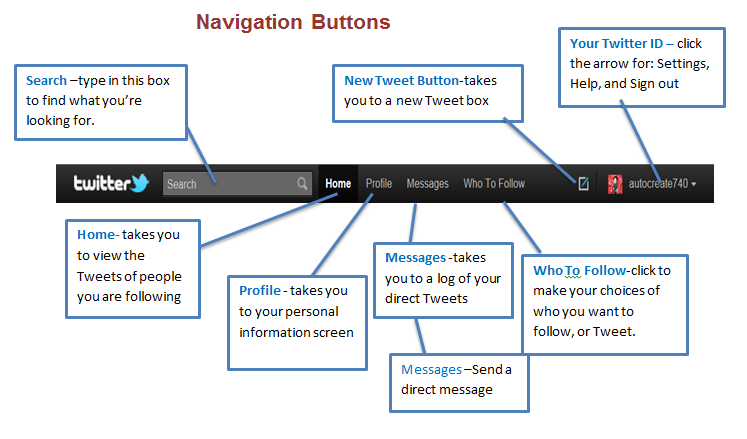
You are now ready to send ‘Tweets‘.  Begin by getting acquainted with the “navigation tabs”,  illustrated below.
Click the image to see a full screen.

Tweet Buttons

I expect that you will become increasingly capable in deciding whom you want to “Follow” .  In the 3rd session of Intro to Twitter_Tech4Boomers, we will cover Avatars, and how to create one.  In the 4th session of Intro to Twitter_Tech4Boomers we will review how to “Follow” other “Tweeps” on  Twitter.

Stay tuned 🙂

Intro to Twitter_Tech4Boomers_Session 1

I have heard from Boomer friends, and family that they have a Twitter account, but have not used it.  Some have said that they just can’t figure out what to do with all the little Icons provided on the screen. Well, in order to assist those who want to join, and those who have already joined, but are not using it, the guidelines in this post are designed to get you started.  In addition, Twitter has a wonderful support system, which is very easy to understand, and easily accessible.

  1. Navigating in Twitter requires that you have an email account.  Make sure you know what password you want to use before you sign-up.

  2. Twitter works via text, therefore the cost of using Twitter is usually what you pay for text messages on your phone.  Check with your carrier before you sign-up, so that you are clear about cost.

Note: Twitter has a 140 character limitation for each Tweet.  Who knows, maybe it’s just what you need to cut down on your bill 🙂 !

  1. You can choose to use your email as your user name; however, many people use their first name as their username so they can be recognized by their friends, and others.

  2. When your account has been created it will have an @symbol placed in front of it, for example, judith would become @judith

Note: Sometimes a number is added to your user name to avoid duplication. You can change your user name at a later date without affecting existing Tweets.

You can create an account at https://Twitter.com,  to fill out a form like the one below, then click the Sign Up button.

The next set of guidelines will show the Twitter Navigation Toolbar from a Personal Computer screen view.
NoteClick the image to see clearly.

See you at the next session.  🙂

Cyberspace Email Manners

If you had to give yourself a grade, what would your mark be for your Cyberspace Email Manners?  Take a look at the chart below and give yourself a grade.  If you’re interested in how you did and want to know more about what are considered acceptable manners on the Internet, check out the articles  I came across from the on-line  Pink Magazine.

Take a moment to read what the experts say 🙂


Yes You Can Backup Your WordPress Blog!

I am sure we have all been there, trying to get out that extraordinary post – you know-  the one that really gets your message out to your followers, and then “uh oh”, your computer,  or your software, or whatever!  Something happens to your Blog!

We’ve all been there at least once.  And, we usually don’t think about backup until that fatal moment when we cannot recover the wonderful piece of genius that we just wrote.  🙂

Well, I am here to tell you, Yes you can backup your WordPress Blog !  with the help of Christopher S. Penn he makes us all protectors of our Blogs!

Check out his guidelines at: http://www.christopherspenn.com/2009/05/how-to-back-up-your-wordpress-blog-in-60-seconds/#disqus_thread

Should Boomers be LinkedIn?

What is LinkedIn used for ?

LinkedIn is a professional social networking site. It’s something like a professional rolodex, which is maintained on the Internet.

  1. To be successful with LinkedIn, it is recommended that you establish your ‘connections with professionals you already know.

  2. If you’re a Boomer entrepreneur, or Boomer just looking for work, it would appear that this is an awesome resource you should tap into.


Below are some guidelines on how to join LinkedIn with integrity.

What is Required?

  1. New Linkedin members should be prepared to include a picture of themselves.  Preferably the picture should be of your face without any designs in the background.
  2.  Make sure your summary is well written, to the point, appealing. so that it makes people want to know more about you.
  3. When you fill in your Bio, as with the ‘older’ style resumes (not so long ago), make sure it is the truth folks.
  4. Send invitations for ‘connections’ to professionals with whom you have a prior business relationship.
  5. Be aware when you send an invitation, you can receive an ‘I don’t know’ (IDK) response from the recipient which counts against you.
  6. Five IDK’s will result in your having to submit your email address every time you try to make a ‘connection’.
  7. Make your profile ‘public’ if you want to reach the full potential of the network.

After you establish your list, below are some perks of being ‘connected’ with LinkedIn, which are covered in Wikipedia:

  1. It can be used to find jobs, people and business opportunities recommended by someone in one’s contact network.
  2. Employers can list jobs and search for potential candidates.
  3. Job seekers can review the profile of hiring managers and discover which of their existing contacts can introduce them.
  4. Users can post their own photos and view photos of others to aid in identification.
  5. Users can now follow different companies and can get notification about the new joining and offers available.
  6. Users can save (i.e., bookmark) jobs, which they would like to apply for.

Guidelines for joining can be found at:

1.     http://learn.linkedin.com/settings/

2.     http://windmillnetworking.com/2009/05/27/linkedin-group-etiquette-what-are-the-rules/

Join at https://www.linkedin.com/reg/join


Below is a great resource for Older Workers (just click the link) 🙂

 http://hubpages.com/tag/older+workers/hot

Cell Phone Cancer YIKES!

According to Google, Dr. Martin Cooper (Motorola) is credited with inventing the first cell phone, and the first person to make a call on a portable cell phone in April  1973. Now, after all these years  (38 to be exact), they are telling us about cell phone cancer?

I’m sure many of you felt a ‘twinge’ of concern at hearing this news.  I wanted to know what I was in store for; I’ve been a cell phone user for more than 20 years.  Although in recent years, I have become more of a cell phone ‘text er  which is faster and more convenient for me.

So, here are some of the facts I discovered from  two  New York Times articles in the Health Section.

First article by Tara Parker- Pope

Piercing the Fog Around Cellphones and Cancer, June 6, 2011 stated some of the following facts:

  1. The World Health Organization declared that it was ‘possible’ the phones could cause cancer.
  2. This is the first time a major health organization has suggested such a link, and it was promptly disputed by many scientists…
  3. The source of the latest claim is the International Agency for Research on Cancer.
  4. The panel based its cellphone findings on the fact that they give off a weak form of energy called nonionizing radiation…
  5. The human studies showed only an association between cellphone use and cancer, not a causal relationship.
  6. Some of the research suggests links to three types of tumors…
  7. All these tumors are rare, so even if cellphone use does increase risk, the risk to any individual is still very low.
  8. Scientists dispute the research because they believe it is plagued by methodological problems.

Tara Parker-Pope wrote a second article

A Doctor Who Must Navigate a Contentious Divide”.

This article covered what Dr. Jonathan Samet, chairman of a World Health Organization committee, thinks about the findings and the reaction to the controversy.  It should be noted that one of  Dr. Samet’s reports was done on tobacco 25 years ago.  He has also done studies on secondhand smoke.  However, in regard to the cellphone findings, The American Cancer Society also said the findings were based on flawed data and should be interpreted with ‘great care’.

For my Baby Boomer friends and family, maybe it’s time to ‘text’ and ‘tweet’ more.  🙂

Creating iphone, ipad, and ipod touch Distribution Lists

Hi “i ” Boomers 🙂

I discovered some useful, and relatively easy to use, iapps this week which i am eager to tell you about.  These apps allow iphone, ipod touch, and ipad users to send email using Distribution lists. Distribution lists allow you to send email to multiple recipients at one time.

The first app i tried on my iphone.

Mail2Group – this app has two versions. 

  1. Mail2Group lite is free, and supports up to 3 email addresses per group.

  2. Mail2Group (regular) supports unlimited email address and cost $1.99.

Notes:

  1. You can view a demo at
    http://tinyurl.com/3mdv5fl

  2. You can get answers to your questions at
    http://tinyurl.com/44ec2xa

————————————————————————————————————————–

The second distribution list app i loaded on my ipad

iEDL (name of app)

You can purchase the app for 1.99 (and it’s worth every penny)!

  1. You can get a demonstration at   http://tinyurl.com/3gjqcmc

  2. You can get additional information at  http://tinyurl.com/3shoknr

That’s all for now 🙂

Boomer Expectations

Hi Boomers,

Have you joined in  or become acquainted with some of the latest Social Networking tools?  Did you join Twitter yet, are you familiar with the terminology being used out there?  Well it’s time to ‘get busy’ ! 

I recently read an article posted at CNN.com indicating the following:
‘Next, the boomer generation will change the way we think about retirement and aging, experts and analysts say, just as they transformed notions of relationships — delayed marriages, fewer children, more divorces — and ideas about careers, with more women in the workplace and adult learning…

The article goes on to say:
“Boomers are all about exploration and transformation.  Many of them reject the idea of retirement that they saw firsthand with their parents, where you stop changing and growing and become a fixed entity,” said Ann Clurman of  The Futures Company, which tracks consumer attitudes that forecast lifestyle and behaviors,  and author of “Generation Ageless:  How Baby Boomers Are Changing the Way We Live Today.”

Check out the article at your first opportunity by clicking this link:  http://tinyurl.com/6xaljlp

Then think about what your Twitter ID is going to be 🙂 !