ERGONOMICS for us Boomers

Hi Boomers,

How’s your back feeling?

According to Wikipedia:
Ergonomics is concerned with the ‘fit’ between people and their technological tools and environments. It takes account of the user’s capabilities and limitations in seeking to ensure that tasks, equipment, information and the environment suit each user.

If you are having problems with various body parts, it may be that you need to adjust/correct your body posture at the computer.

In my recent cybertravels,  i looked for information that might be useful in helping you to relieve some of the stress on your body while working at the computer.

The site the chart was reproduced from is:  http://www.ergonomics-info.com/ergonomic-exercises.html

I suggest you visit the site when you next have an opportunity, or ache from working at the computer.   🙂

To get a closer look at the chart:  Place your mouse pointer on the image, then click with your left mouse button.

To print the chart:  Double click the image (to enlarge it) , Click File, Click Print


FACEBOOK CHANGES AGAIN

Hi Facebook Boomers,

On Twitter this week i noticed an interesting NYT article by Nick Bilton ,

Facebook Changes Privacy Settings to Enable Facial Recognition. 

I think you might want to be aware of the following changes to your Facebook accounts.  These are some of the highlights in the article:

  1. Facebook recently began changing its users privacy settings to automatically turn on a facial recognition feature that detects a user’s face in an image.
  2. Once the person’s face is detected, the Web site then encourages Facebook friends to tag them.
  3. Facebook also doesn’t give users the option to avoid being tagged in a photo; instead, people who don’t want their name attached to an image must untag themselves after the fact.
  4. You can change the privacy settings relating to the facial recognition feature, but it is a little confusing.
  5. If you want to disable the feature, you have to access your account privacy settings  and click “customize settings” at the bottom of the page.  Scroll down to a list called “things to share”
  6. Click on the button that says “suggest photos of me to friends”.
  7. At this point you will receive the option to disable the facial recognition feature.

This is a great resource for technology news.

You can follow Nick Bilton on Twitter @nickbilton

Why Twitter?

What’s happening Boomers?

It  occurred to me that some of you may want to know why you should join Twitter since there are other things you can do on the Internet.  Most of you are already using a cell phone, and email. Some of you are on Facebook; some are texting.  Some of you are thinking the whole social media “thing ” is out of control! You have as much info as you can stand!

Why Twitter?  Well, other than the fact I am on Twitter (smile), below are some of the reasons i joined.

I found the following explanation  to be one of the best, and check the date it was written!  2007!

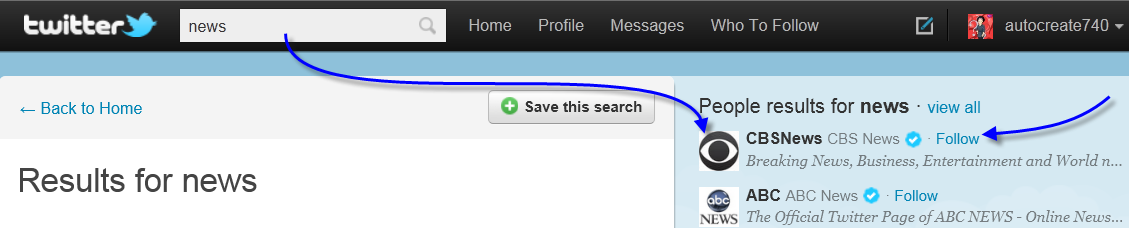
Click the link to the website if you want to create an account and get a detailed description about how Twitter works.

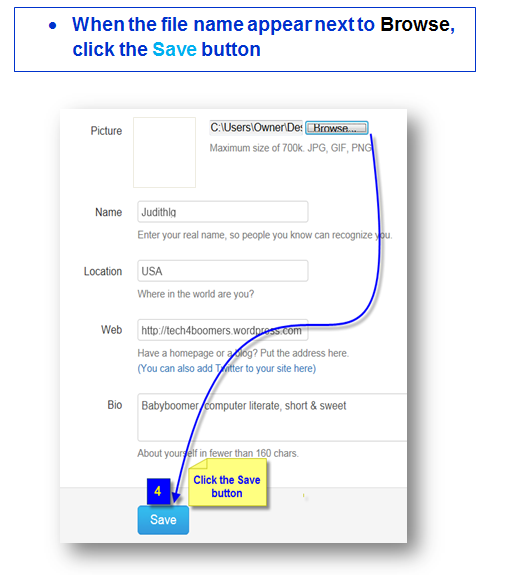
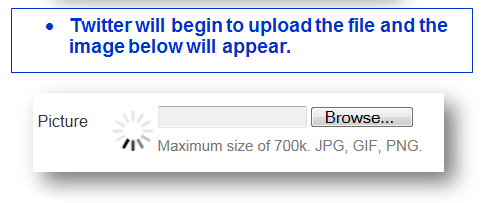
For those of you who want a more graphic description how to join  Twitterland, i will be providing that in the near  future, or  you can join at the surprising addresses below.

In the meanwhile, Newbie’s who take the plunge, let me hear your comments after you join.

—————————————————————————————————————————————

March 15, 2007 4:15 PM PDT

Newbie’s guide to Twitter

If you’re not using Twitter yet, you may feel as if you’ve missed out. Twitter has not only tipped the tuna, but by some estimations, it has already jumped the shark. Don’t be put off by its excessive popularity with SXSW geeks or by the whining of Twitter haters who missed the fun. Twitter is an interesting and practical real-time messaging system for groups and friends. It’s just not completely obvious how to get into the “club.” So, here’s a newbie’s guide to this new platform. We don’t cover every feature of Twitter, but this should help get you started.

What is Twitter?

Twitter is an online service that enables you to broadcast short messages to your friends or “followers.” It also lets you specify which Twitter users you want to follow so you can read their messages in one place.

Read more: http://news.cnet.com/newbies-guide-to-twitter/#ixzz1Ni3kpJEl

*********************************************************************************************

Guess what ?  You can even follow the President?

http://twitter.com/BARACKOBAMA

********************************************************************************************

Missing Oprah?  Want to know what she’s doing?   🙂

http://twitter.com/OPRAH

Looking forward to hearing about your favorite people to follow 🙂 !