Intro to Twitter_Tech4Boomers_Session 1

I have heard from Boomer friends, and family that they have a Twitter account, but have not used it.  Some have said that they just can’t figure out what to do with all the little Icons provided on the screen. Well, in order to assist those who want to join, and those who have already joined, but are not using it, the guidelines in this post are designed to get you started.  In addition, Twitter has a wonderful support system, which is very easy to understand, and easily accessible.

  1. Navigating in Twitter requires that you have an email account.  Make sure you know what password you want to use before you sign-up.

  2. Twitter works via text, therefore the cost of using Twitter is usually what you pay for text messages on your phone.  Check with your carrier before you sign-up, so that you are clear about cost.

Note: Twitter has a 140 character limitation for each Tweet.  Who knows, maybe it’s just what you need to cut down on your bill 🙂 !

  1. You can choose to use your email as your user name; however, many people use their first name as their username so they can be recognized by their friends, and others.

  2. When your account has been created it will have an @symbol placed in front of it, for example, judith would become @judith

Note: Sometimes a number is added to your user name to avoid duplication. You can change your user name at a later date without affecting existing Tweets.

You can create an account at https://Twitter.com,  to fill out a form like the one below, then click the Sign Up button.

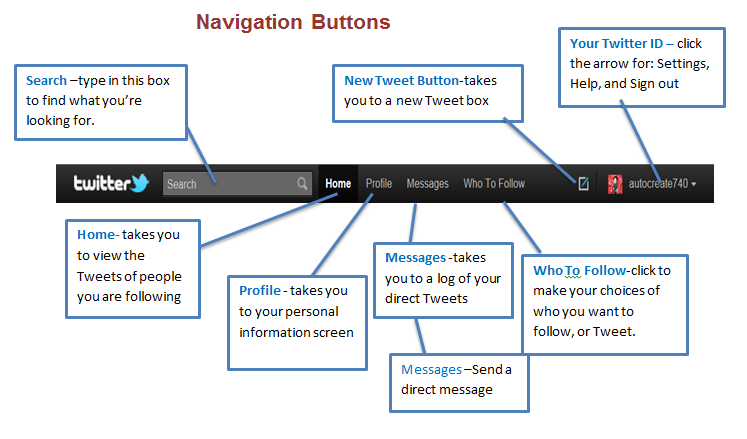
The next set of guidelines will show the Twitter Navigation Toolbar from a Personal Computer screen view.
NoteClick the image to see clearly.

See you at the next session.  🙂

NO PHISHING PLEASE!

  Nowadays it’s smart to  think cautiously BEFORE you open any emails from sources whom you do not recognize.  Why??  PHISHING !  Below is a description I found in Wikipedia.

Phishing is a way of attempting to acquire sensitive information such as usernames, passwords and credit card details by masquerading as a trustworthy entity in an electronic communication. Communications purporting to be from popular social web sites, auction sites, online payment processors or IT administrators are commonly used to lure the unsuspecting public. Phishing is typically carried out by e-mail spoofing or instant messaging,

[1] It often directs users to enter details at a fake website whose look and feel are almost identical to the legitimate one. Phishing is an example of social engineering techniques used to deceive users.

[2] Exploits the poor usability of current web security technologies.

[3] Attempts to deal with the growing number of reported phishing incidents include legislation, user training, public awareness, and technical security measures.

Take a look at the guidelines provided  by APWG  in order to learn how to protect yourself from this type of Internet crime.

Anti-Phishing Working Group
The Anti-Phishing Working Group (APWG) is the global pan-industrial and law enforcement association focused on eliminating the fraud and identity theft that result from phishing,pharming and email spoofing of all types.

http://www.antiphishing.org/consumer_recs.html

Be careful folks!

Cyberspace Email Manners

If you had to give yourself a grade, what would your mark be for your Cyberspace Email Manners?  Take a look at the chart below and give yourself a grade.  If you’re interested in how you did and want to know more about what are considered acceptable manners on the Internet, check out the articles  I came across from the on-line  Pink Magazine.

Take a moment to read what the experts say 🙂


Yes You Can Backup Your WordPress Blog!

I am sure we have all been there, trying to get out that extraordinary post – you know-  the one that really gets your message out to your followers, and then “uh oh”, your computer,  or your software, or whatever!  Something happens to your Blog!

We’ve all been there at least once.  And, we usually don’t think about backup until that fatal moment when we cannot recover the wonderful piece of genius that we just wrote.  🙂

Well, I am here to tell you, Yes you can backup your WordPress Blog !  with the help of Christopher S. Penn he makes us all protectors of our Blogs!

Check out his guidelines at: http://www.christopherspenn.com/2009/05/how-to-back-up-your-wordpress-blog-in-60-seconds/#disqus_thread

Should Boomers be LinkedIn?

What is LinkedIn used for ?

LinkedIn is a professional social networking site. It’s something like a professional rolodex, which is maintained on the Internet.

  1. To be successful with LinkedIn, it is recommended that you establish your ‘connections with professionals you already know.

  2. If you’re a Boomer entrepreneur, or Boomer just looking for work, it would appear that this is an awesome resource you should tap into.


Below are some guidelines on how to join LinkedIn with integrity.

What is Required?

  1. New Linkedin members should be prepared to include a picture of themselves.  Preferably the picture should be of your face without any designs in the background.
  2.  Make sure your summary is well written, to the point, appealing. so that it makes people want to know more about you.
  3. When you fill in your Bio, as with the ‘older’ style resumes (not so long ago), make sure it is the truth folks.
  4. Send invitations for ‘connections’ to professionals with whom you have a prior business relationship.
  5. Be aware when you send an invitation, you can receive an ‘I don’t know’ (IDK) response from the recipient which counts against you.
  6. Five IDK’s will result in your having to submit your email address every time you try to make a ‘connection’.
  7. Make your profile ‘public’ if you want to reach the full potential of the network.

After you establish your list, below are some perks of being ‘connected’ with LinkedIn, which are covered in Wikipedia:

  1. It can be used to find jobs, people and business opportunities recommended by someone in one’s contact network.
  2. Employers can list jobs and search for potential candidates.
  3. Job seekers can review the profile of hiring managers and discover which of their existing contacts can introduce them.
  4. Users can post their own photos and view photos of others to aid in identification.
  5. Users can now follow different companies and can get notification about the new joining and offers available.
  6. Users can save (i.e., bookmark) jobs, which they would like to apply for.

Guidelines for joining can be found at:

1.     http://learn.linkedin.com/settings/

2.     http://windmillnetworking.com/2009/05/27/linkedin-group-etiquette-what-are-the-rules/

Join at https://www.linkedin.com/reg/join


Below is a great resource for Older Workers (just click the link) 🙂

 http://hubpages.com/tag/older+workers/hot

ERGONOMICS for us Boomers

Hi Boomers,

How’s your back feeling?

According to Wikipedia:
Ergonomics is concerned with the ‘fit’ between people and their technological tools and environments. It takes account of the user’s capabilities and limitations in seeking to ensure that tasks, equipment, information and the environment suit each user.

If you are having problems with various body parts, it may be that you need to adjust/correct your body posture at the computer.

In my recent cybertravels,  i looked for information that might be useful in helping you to relieve some of the stress on your body while working at the computer.

The site the chart was reproduced from is:  http://www.ergonomics-info.com/ergonomic-exercises.html

I suggest you visit the site when you next have an opportunity, or ache from working at the computer.   🙂

To get a closer look at the chart:  Place your mouse pointer on the image, then click with your left mouse button.

To print the chart:  Double click the image (to enlarge it) , Click File, Click Print


Great APPS for ANDROID FANS

For ANDROID Boomers

Can you imagine?  Not all of my Boomer friends & family are iphone owners/users-fans!  (Go figure).

Anyway, in the interest of being ‘balanced‘,  i wanted to suggest you take a look at  some of the apps available for the Android phone.

Below are three sites that gave their opinions.  You can go to each website to see the full list of available apps. In this post, i highlight some apps that caught my interest. These are all free 🙂 !

http://gizmodo.com/5739420/the-best-android-apps

Entertainment

The Best Android AppsSoundHound: Shazam gets all the pub but SoundHound is just as good at identifying music and better for Android because there’s no limit on how many songs you tag per month. Soundhound also throws in lyrics and links to videos too. Free ( i have this app on my iphone, and it’s great!)


The Best Android AppsWords with Friends: Finally available on Android, Words with Friends lets you dominate your Android and iPhone-wielding friends (cross-platform gaming!) with your vocabulary skills and astute tile placement. Free

Productivity

The Best Android AppsAstrid Task/To Do List: No other app gives as much detail to to do lists as Astrid. Its “advanced” options lets you set priority levels, integrate with Google Calendar, sync with Google tasks, and set up tags, alerts and periodic reminders. Astrid keeps it easy, for the most part, but also offers deeper settings if you’re the obsessive, customize-everything exactly-how-you-want-it type. Free.

Another site i checked out is
http://www.digitaltrends.com/mobile/best-android-apps/

These are some of the apps i liked.

Utilities

gas-buddy-iconGas Buddy (Free)

With gas prices still consistently rising, the quest for the cheapest nearby gas can be a frustrating and pointless task, especially if you are driving around wasting precious fuel to find a better price just for the heck of saying you did. Gas Buddy uses your location to quickly locate nearby gas stations and immediately give you the best price around. The app gives you a list and a helpful map of all of your options. Never again will you fill up only to drive by a less expensive station five blocks later.

*************************************

iTriage Mobile HealthiTriage Mobile Health (Free)

Created by doctors, this app is designed to give users quick and easy access to medical info as well as nearby treatment facilities. With just a few clicks, users can find the nearest medical facility based on need (emergency, urgent care, pharmacy, etc.) and quickly use built-in Google Maps to navigate to the destination. The app also features a symptom-checker, doctor directory, and information about diseases and procedures.

Lifestyle

The Best Android AppsFlash Player 10.2: I really don’t care if Flash is good for the web or not, I just want to see as much web content as I can on my Android phone. Downloading Flash Player 10.2 gets me one step closer to that. Free.

FINALLY, Take the Tour at
http://gist.com/corp/why-gist/view-all-your-contacts
Below is their description of GIST

****************************************************

Add Contacts Automatically

Your contacts are everywhere. They are in email, social networks, on your mobile phone and many other sources. Gist brings your contacts into one place to give you a full view of your network making it easy to find anyone, anytime.

That’s all for now about Android 🙂

Creating iphone, ipad, and ipod touch Distribution Lists

Hi “i ” Boomers 🙂

I discovered some useful, and relatively easy to use, iapps this week which i am eager to tell you about.  These apps allow iphone, ipod touch, and ipad users to send email using Distribution lists. Distribution lists allow you to send email to multiple recipients at one time.

The first app i tried on my iphone.

Mail2Group – this app has two versions. 

  1. Mail2Group lite is free, and supports up to 3 email addresses per group.

  2. Mail2Group (regular) supports unlimited email address and cost $1.99.

Notes:

  1. You can view a demo at
    http://tinyurl.com/3mdv5fl

  2. You can get answers to your questions at
    http://tinyurl.com/44ec2xa

————————————————————————————————————————–

The second distribution list app i loaded on my ipad

iEDL (name of app)

You can purchase the app for 1.99 (and it’s worth every penny)!

  1. You can get a demonstration at   http://tinyurl.com/3gjqcmc

  2. You can get additional information at  http://tinyurl.com/3shoknr

That’s all for now 🙂

What is Social Networking Anyway?

Hi Boomers,

As i was wandering about on the Internet, i came across the following explanation i thought would be useful as you ponder why one should join in with the current cyber happenings on our Planet :).   I hope that these little excerpts will convince you to join me on Twitter.  Come on, don’t be a cyber-wallflower’.   Join in,  and get to know what others are thinking about on the Planet

It’s cybertravel time !  🙂

What is Social Networking?

Social Networking Explained From Daniel Nations,
former About.com Guide

  • Social Networking has become very popular during the past few years, but it can still be very difficult to understand for someone new to social networking. The open-ended nature of social networks add to this. Once signed onto a social network, having answered a few basic profile questions, it is easy to sit back and wonder what you are supposed to do next.
  • The easiest way to understand social networking is to think of it like high school. You had friends in school, and you knew quite a few people even if you weren’t friends with all of them, but it’s likely that you didn’t know everyone.
  • If you ever moved to a new school — or if you can imagine moving to a new school — you start out with no friends. After attending classes, you start meeting people, and as you meet them, you begin associating with those that have similar interests.

Do you need more convincing?

Stay tuned!
This discussion will go on!  In the meanwhile, have you figured out your Twitter ID yet ? 🙂

Boomer Expectations

Hi Boomers,

Have you joined in  or become acquainted with some of the latest Social Networking tools?  Did you join Twitter yet, are you familiar with the terminology being used out there?  Well it’s time to ‘get busy’ ! 

I recently read an article posted at CNN.com indicating the following:
‘Next, the boomer generation will change the way we think about retirement and aging, experts and analysts say, just as they transformed notions of relationships — delayed marriages, fewer children, more divorces — and ideas about careers, with more women in the workplace and adult learning…

The article goes on to say:
“Boomers are all about exploration and transformation.  Many of them reject the idea of retirement that they saw firsthand with their parents, where you stop changing and growing and become a fixed entity,” said Ann Clurman of  The Futures Company, which tracks consumer attitudes that forecast lifestyle and behaviors,  and author of “Generation Ageless:  How Baby Boomers Are Changing the Way We Live Today.”

Check out the article at your first opportunity by clicking this link:  http://tinyurl.com/6xaljlp

Then think about what your Twitter ID is going to be 🙂 !